
Tutorial 11a — ISO 10110 Fabrication Drawings#
This tutorial demonstrates how to generate ISO 10110-compliant fabrication drawings directly from an optiland lens design.
What is ISO 10110?#
ISO 10110 is the international standard for optical element drawings used in manufacturing. It defines a coding system that annotates lens drawings with:
Code |
ISO Part |
Description |
|---|---|---|
|
10110-2 |
Stress birefringence (nm/cm) |
|
10110-3 |
Bubbles and inclusions |
|
10110-4 |
Inhomogeneity and striae |
|
10110-5 |
Surface form error (waves P-V) |
|
10110-6 |
Centration tolerance (arcmin) |
|
10110-7 |
Surface imperfections (scratch-dig) |
Architecture#
The optiland.iso10110 module works as a fabrication annotation layer on top of the optical model:
Optic (geometry only)
    ↓
DrawingSpec (geometry + tolerances)
    ↓
ISO10110Report → DXF + PDF
Surface-level specs (
3/,4/,5/): annotated per surface — filled in by the optical designerElement-level specs (
0/,1/,2/): bulk glass quality — typically negotiated with the glass supplier / optician
Unspecified fields render as — so drawings can be issued incrementally.
Installation: PDF and PNG output work with a plain pip install optiland. DXF export (sections 5.1 and 6) additionally needs the manufacturing extra: pip install optiland[manufacturing].
1. Define the Lens System#
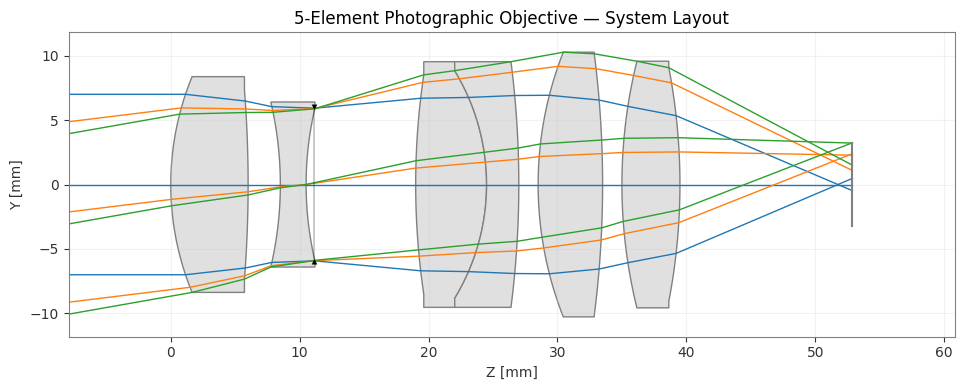
We design a 5-element photographic objective (f ≈ 50 mm, f/4) with one cemented doublet. The layout is inspired by a modified Tessar / Heliar type:
E1 (singlet)   E2 (singlet)   E3 (cemented doublet)   E4 (singlet)   E5 (singlet)
──┬──          ──┬──          ──┬───┬──                ──┬──          ──┬──
  │               │              │   │ cement              │               │
──┴──          ──┴──          ──┴───┴──                ──┴──          ──┴──
       [STOP between E2 and E3]
[1]:
import numpy as np
import matplotlib.pyplot as plt
from pathlib import Path

from optiland import optic
import optiland.backend as be

lens = optic.Optic(name='5-Element Photographic Objective')

# ── Object ──────────────────────────────────────────────────────────────────
lens.surfaces.add(index=0, radius=be.inf, thickness=be.inf)

# ── Element 1: biconvex singlet  N-BK7 ─────────────────────────────────────
lens.surfaces.add(index=1, radius=22.0,   thickness=6.0,  material='N-BK7')
lens.surfaces.add(index=2, radius=-95.0,  thickness=2.5)

# ── Element 2: negative meniscus  N-SF2 ────────────────────────────────────
lens.surfaces.add(index=3, radius=-28.0,  thickness=2.0,  material='N-SF2')
lens.surfaces.add(index=4, radius=26.0,   thickness=8.5,  is_stop=True)

# ── Element 3: cemented doublet  N-BAK1 / N-SF5 ────────────────────────────
lens.surfaces.add(index=5, radius=58.0,   thickness=5.5,  material='N-BAK1')
lens.surfaces.add(index=6, radius=-17.0,  thickness=2.5,  material='N-SF5')   # cement
lens.surfaces.add(index=7, radius=-75.0,  thickness=1.5)

# ── Element 4: biconvex singlet  N-SSK5 ────────────────────────────────────
lens.surfaces.add(index=8, radius=28.0,   thickness=5.0,  material='N-SSK5')
lens.surfaces.add(index=9, radius=-80.0,  thickness=1.5)

# ── Element 5: positive singlet  N-LAK22 ───────────────────────────────────
lens.surfaces.add(index=10, radius=40.0,  thickness=4.5,  material='N-LAK22')
lens.surfaces.add(index=11, radius=-48.0, thickness=0.0)  # BFD set by image_solve

# ── Image ────────────────────────────────────────────────────────────────────
lens.surfaces.add(index=12)

# ── System aperture and fields ───────────────────────────────────────────────
lens.set_aperture(aperture_type='EPD', value=14.0)
lens.fields.set_type('angle')
lens.fields.add(y=0.0)
lens.fields.add(y=7.0)
lens.fields.add(y=10.0)

lens.wavelengths.add(value=0.4861)
lens.wavelengths.add(value=0.5876, is_primary=True)
lens.wavelengths.add(value=0.6563)

lens.updater.image_solve()
print(lens.surfaces.surfaces[11].thickness)
lens.updater.update_paraxial()

print('Total track: ', lens.total_track, 'mm')
print('Surfaces:    ', lens.surfaces.num_surfaces)
13.381058440952472
Total track:  52.88105844095247 mm
Surfaces:     13
[2]:
# Trace rays to populate semi-apertures on all surfaces
lens.trace(Hx=0, Hy=0, wavelength=0.5876, num_rays=100)

# Quick system overview
lens.draw(num_rays=3, figsize=(12, 4))
plt.title('5-Element Photographic Objective — System Layout')
plt.tight_layout()
plt.show()
[3]:
# Print the lens prescription
lens.info()
╒════╤═════════════════╤═══════════╤══════════╤═════════════╤════════════╤═════════╤═════════════════╕
│    │ Type            │ Comment   │   Radius │   Thickness │ Material   │   Conic │   Semi-aperture │
╞════╪═════════════════╪═══════════╪══════════╪═════════════╪════════════╪═════════╪═════════════════╡
│  0 │ Planar          │           │      inf │    inf      │ Air        │       0 │         8.66057 │
│  1 │ Standard        │           │       22 │      6      │ N-BK7      │       0 │         8.66057 │
│  2 │ Standard        │           │      -95 │      2.5    │ Air        │       0 │         7.15831 │
│  3 │ Standard        │           │      -28 │      2      │ N-SF2      │       0 │         6.11153 │
│  4 │ Stop - Standard │           │       26 │      8.5    │ Air        │       0 │         5.77489 │
│  5 │ Standard        │           │       58 │      5.5    │ N-BAK1     │       0 │         8.27375 │
│  6 │ Standard        │           │      -17 │      2.5    │ N-SF5      │       0 │         9.01635 │
│  7 │ Standard        │           │      -75 │      1.5    │ Air        │       0 │         9.4131  │
│  8 │ Standard        │           │       28 │      5      │ N-SSK5     │       0 │         9.68465 │
│  9 │ Standard        │           │      -80 │      1.5    │ Air        │       0 │         9.54383 │
│ 10 │ Standard        │           │       40 │      4.5    │ N-LAK22    │       0 │         9.35595 │
│ 11 │ Standard        │           │      -48 │     13.3811 │ Air        │       0 │         8.59949 │
│ 12 │ Planar          │           │      inf │    nan      │ Air        │       0 │         3.32454 │
╘════╧═════════════════╧═══════════╧══════════╧═════════════╧════════════╧═════════╧═════════════════╛
2. Identify Lens Elements#
identify_elements() walks the surface sequence and groups consecutive glass-bounded surfaces into LensElement objects. It recognises cemented doublets automatically.
[4]:
from optiland.iso10110 import identify_elements

elements = identify_elements(lens)

print(f'Found {len(elements)} elements:\n')
for i, e in enumerate(elements):
    mats = [m.name if hasattr(m, 'name') else m.__class__.__name__
            for m in e.glass_materials]
    sa_vals = [f'{e.semi_aperture(j, lens):.2f}' for j in range(len(e.surfaces))]
    ct = e.center_thickness(lens)
    print(f'  Element {i+1}:  surfaces {e.surface_indices}  '
          f'glass={mats}  CT={ct:.2f} mm  '
          f'{"cemented doublet" if e.is_cemented else "singlet"}')
Found 5 elements:

  Element 1:  surfaces [1, 2]  glass=['N-BK7']  CT=6.00 mm  singlet
  Element 2:  surfaces [3, 4]  glass=['N-SF2']  CT=2.00 mm  singlet
  Element 3:  surfaces [5, 6, 7]  glass=['N-BAK1', 'N-SF5']  CT=8.00 mm  cemented doublet
  Element 4:  surfaces [8, 9]  glass=['N-SSK5']  CT=5.00 mm  singlet
  Element 5:  surfaces [10, 11]  glass=['N-LAK22']  CT=4.50 mm  singlet
3. Build the Drawing Specification#
3.1 Surface-level tolerances (designer fills these in)#
Based on a tolerancing analysis (not shown here), we assign:
3/Surface form error in waves P-V at 633 nm4/Centration tolerance in arcmin5/Surface imperfection in ISO dimensional notation
[5]:
from optiland.iso10110 import DrawingSpec

spec = DrawingSpec(lens, project_name='5-Element Photographic Objective')

# ── Element 1 surfaces ──────────────────────────────────────────────────────
spec.set_surface(1,  irregularity=0.5, rotationally_symmetric=0.25,
                     centration=0.5,  imperfections='2x0.04')
spec.set_surface(2,  irregularity=1.0, centration=0.5,  imperfections='2x0.063')

# ── Element 2 surfaces ──────────────────────────────────────────────────────
spec.set_surface(3,  irregularity=0.5, centration=1.0,  imperfections='2x0.04')
spec.set_surface(4,  irregularity=0.5, centration=1.0,  imperfections='2x0.04')

# ── Element 3 (cemented doublet) surfaces ───────────────────────────────────
spec.set_surface(5,  irregularity=0.5, centration=0.5,  imperfections='2x0.04')
spec.set_surface(6,  irregularity=0.25, centration=0.5, imperfections='5x0.016'  # cement: tighter
                 )
spec.set_surface(7,  irregularity=0.5, centration=0.5,  imperfections='2x0.04')

# ── Element 4 surfaces ──────────────────────────────────────────────────────
spec.set_surface(8,  irregularity=0.5, centration=0.5,  imperfections='2x0.063')
spec.set_surface(9,  irregularity=1.0, centration=0.5,  imperfections='2x0.063')

# ── Element 5 surfaces ──────────────────────────────────────────────────────
spec.set_surface(10, irregularity=0.5, centration=0.5,  imperfections='2x0.04')
spec.set_surface(11, irregularity=0.5, centration=0.5,  imperfections='2x0.04')

print('Surface specs set.')
Surface specs set.
3.2 Element-level glass quality (optician / procurement fills these in)#
Glass quality codes are bulk material properties. These are either specified from the glass manufacturer’s data sheet or negotiated with the supplier. Unspecified fields will appear as — in the drawing.
[6]:
# Element 0 → E1 (N-BK7 singlet)
spec.set_element(0,
    birefringence=10,
    bubbles='1x0.16',
    homogeneity_grade=2,
    striae_grade='A',
)
spec.set_title(0,
    part_number='OPT-001',
    drawn_by='AB',
    approved_by='CD',
    revision='A',
)

# Element 1 → E2 (N-SF2 negative singlet)
spec.set_element(1,
    birefringence=10,
    bubbles='1x0.16',
    homogeneity_grade=2,
    striae_grade='B',
)
spec.set_title(1,
    part_number='OPT-002',
    drawn_by='AB',
    approved_by='CD',
)

# Element 2 → E3 (cemented doublet N-BAK1 / N-SF5)
spec.set_element(2,
    birefringence=6,          # tighter: cemented optics are stress-sensitive
    bubbles='1x0.10',
    homogeneity_grade=2,
    striae_grade='A',
)
spec.set_title(2,
    part_number='OPT-003',
    drawn_by='AB',
    approved_by='CD',
    notes='Cement with NOA-61 or equivalent UV adhesive.',
)

# Element 3 → E4 (N-SSK5)
spec.set_element(3,
    birefringence=10,
    bubbles='1x0.16',
    homogeneity_grade=3,
    striae_grade='B',
)
spec.set_title(3,
    part_number='OPT-004',
    drawn_by='AB',
)

# Element 4 → E5 (N-LAK22)
spec.set_element(4,
    birefringence=10,
    bubbles='1x0.16',
    homogeneity_grade=2,
    striae_grade='A',
)
spec.set_title(4,
    part_number='OPT-005',
    drawn_by='AB',
)

print('DrawingSpec:', spec)
DrawingSpec: DrawingSpec(5 elements, 11 surface specs, 5 element specs)
3.3 Save the spec to YAML (hand-off to optician)#
The spec can be persisted and reloaded independently of the optic, enabling an iterative workflow where the optical designer and the manufacturing team collaborate asynchronously.
[7]:
spec.save_yaml('photographic_lens_spec.yaml')
print('Spec saved to photographic_lens_spec.yaml')

# Round-trip verification
spec2 = DrawingSpec.load_yaml('photographic_lens_spec.yaml', lens)
print('Reloaded:', spec2)
print('E0 part number:', spec2.get_element_spec(0).part_number)
print('S1 form error: ', spec2.get_surface_spec(1).fmt_form_error())
Spec saved to photographic_lens_spec.yaml
Reloaded: DrawingSpec(5 elements, 11 surface specs, 5 element specs)
E0 part number: OPT-001
S1 form error:  3/ (0.5/0.25); λ=546.1 nm
4. Generate the Drawings#
ISO10110Report iterates over all elements and builds one drawing per element. show() previews them inline with matplotlib; the same layout is written to DXF by save_dxf().
[8]:
from optiland.iso10110 import ISO10110Report

report = ISO10110Report(spec)
report.generate()
print(f'Generated {len(report)} element drawings')
Generated 5 element drawings
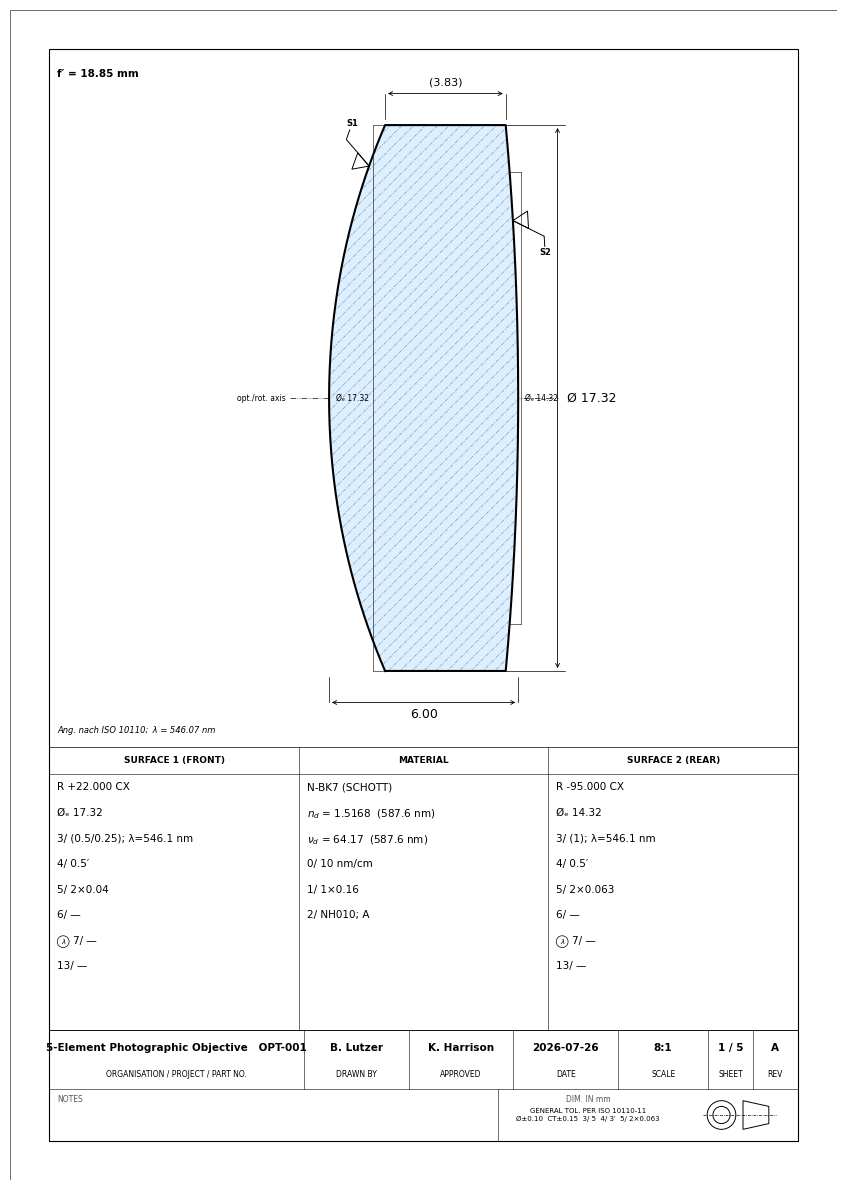
4.1 Preview — Element 1 (N-BK7 biconvex singlet)#
[9]:
report.show(element_index=0, figsize=(16.5, 11.7))
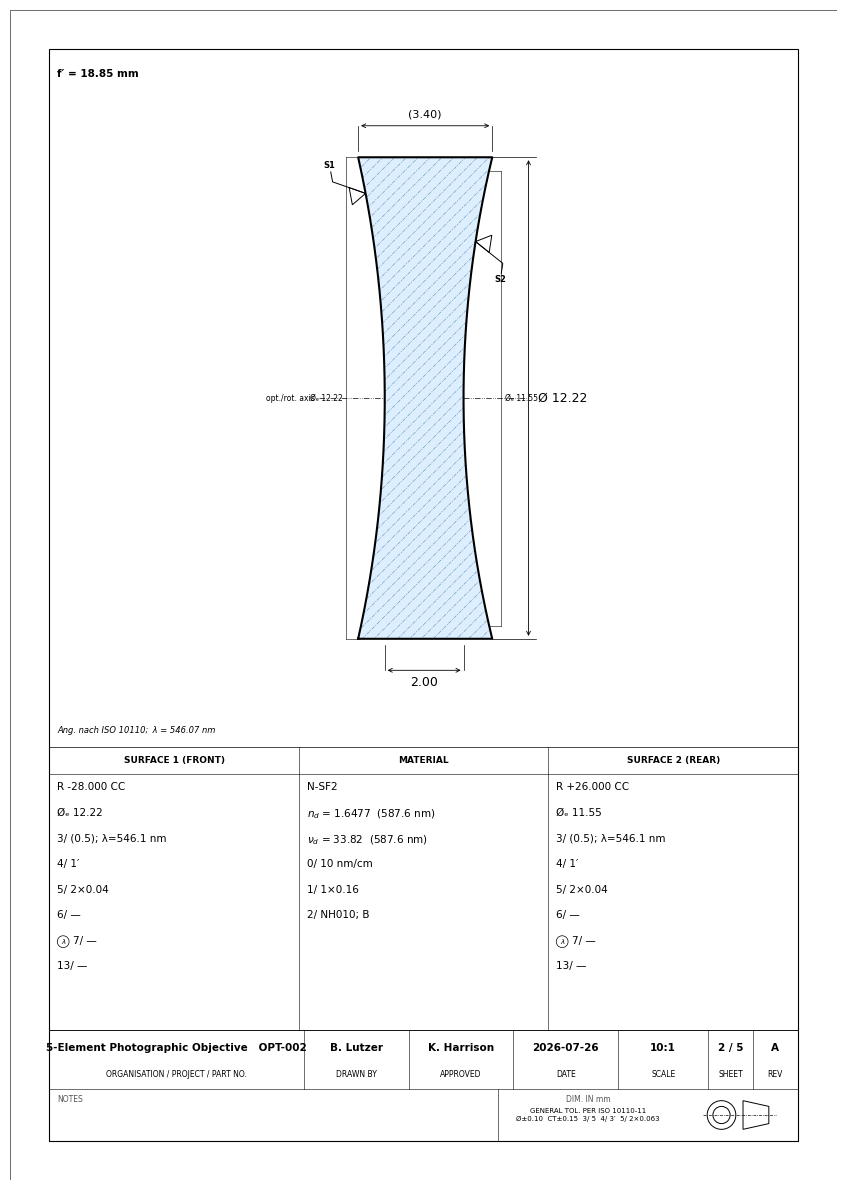
4.2 Preview — Element 2 (N-SF2 negative singlet)#
[10]:
report.show(element_index=1, figsize=(16.5, 11.7))
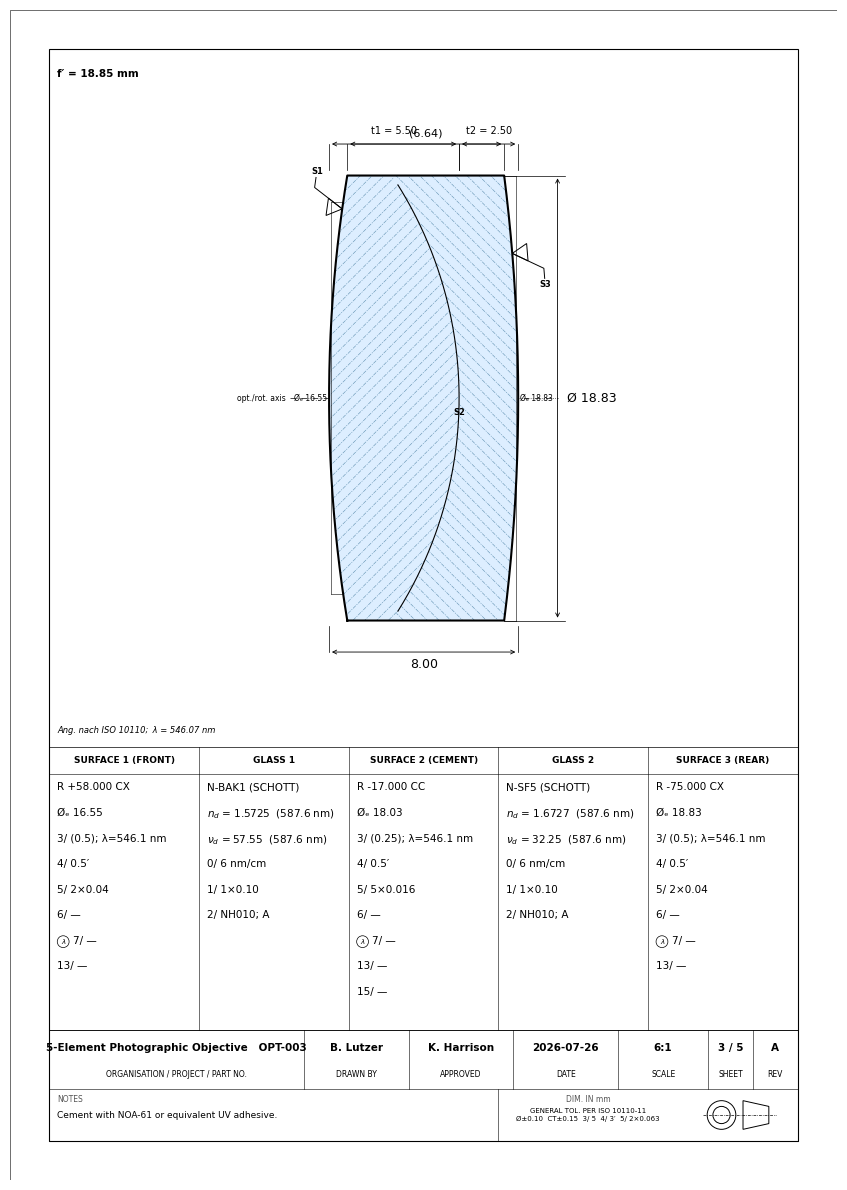
4.3 Preview — Element 3 (cemented doublet N-BAK1 / N-SF5)#
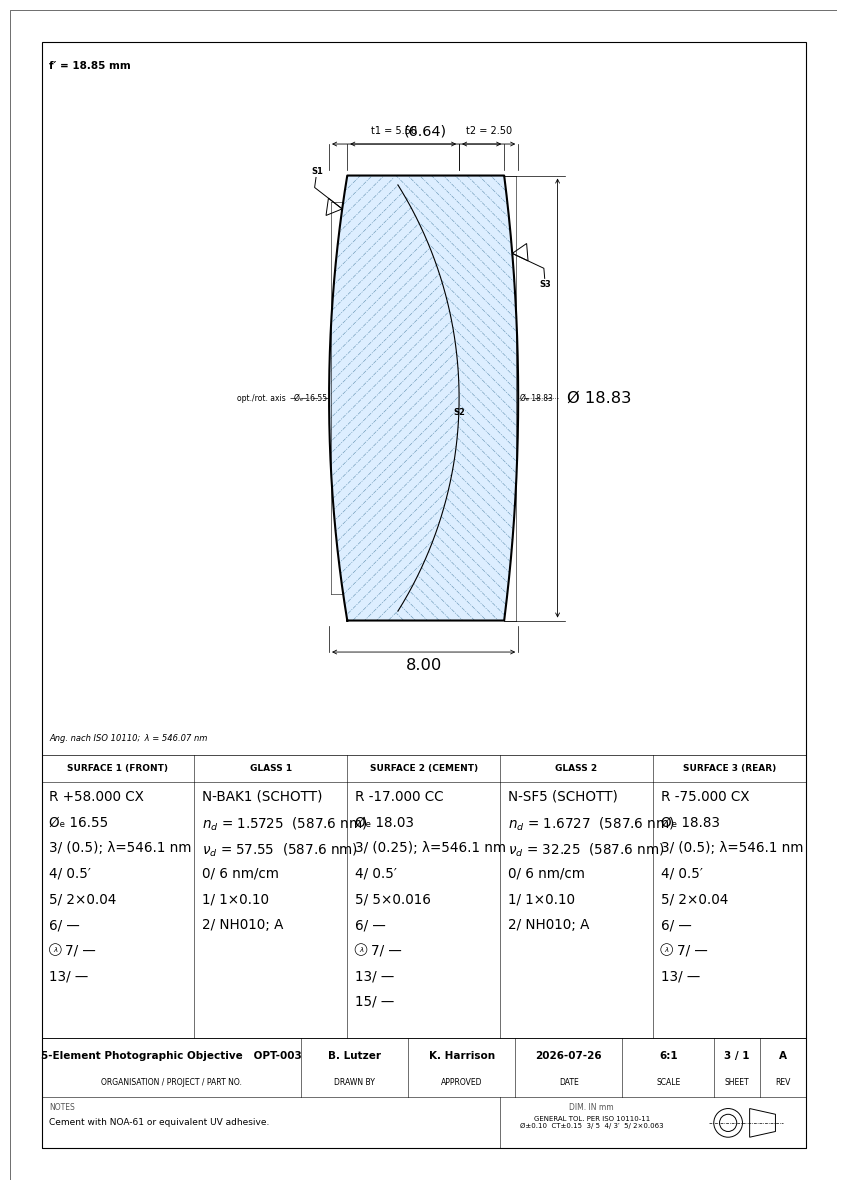
The cement interface is drawn as a thin solid line inside the element outline. Component thicknesses t1 and t2 are dimensioned above the outline.
[11]:
report.show(element_index=2, figsize=(16.5, 11.7))
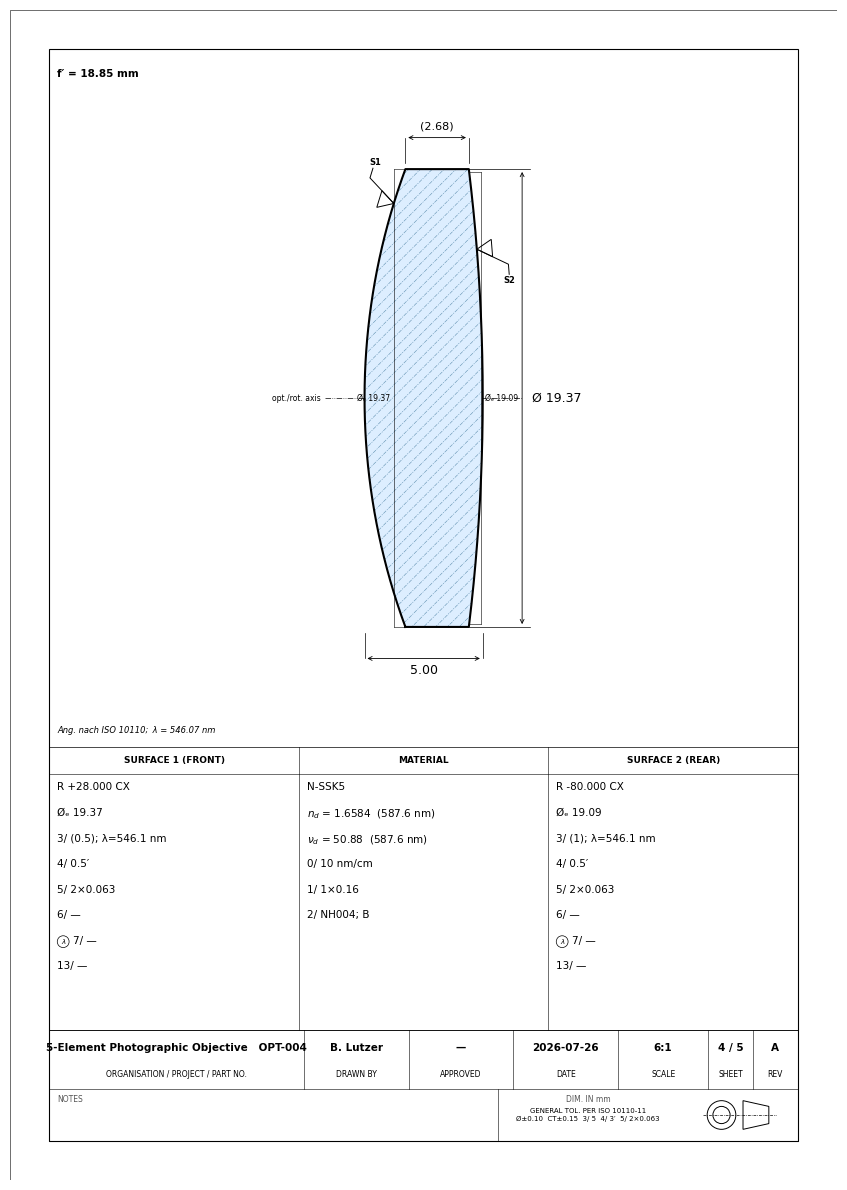
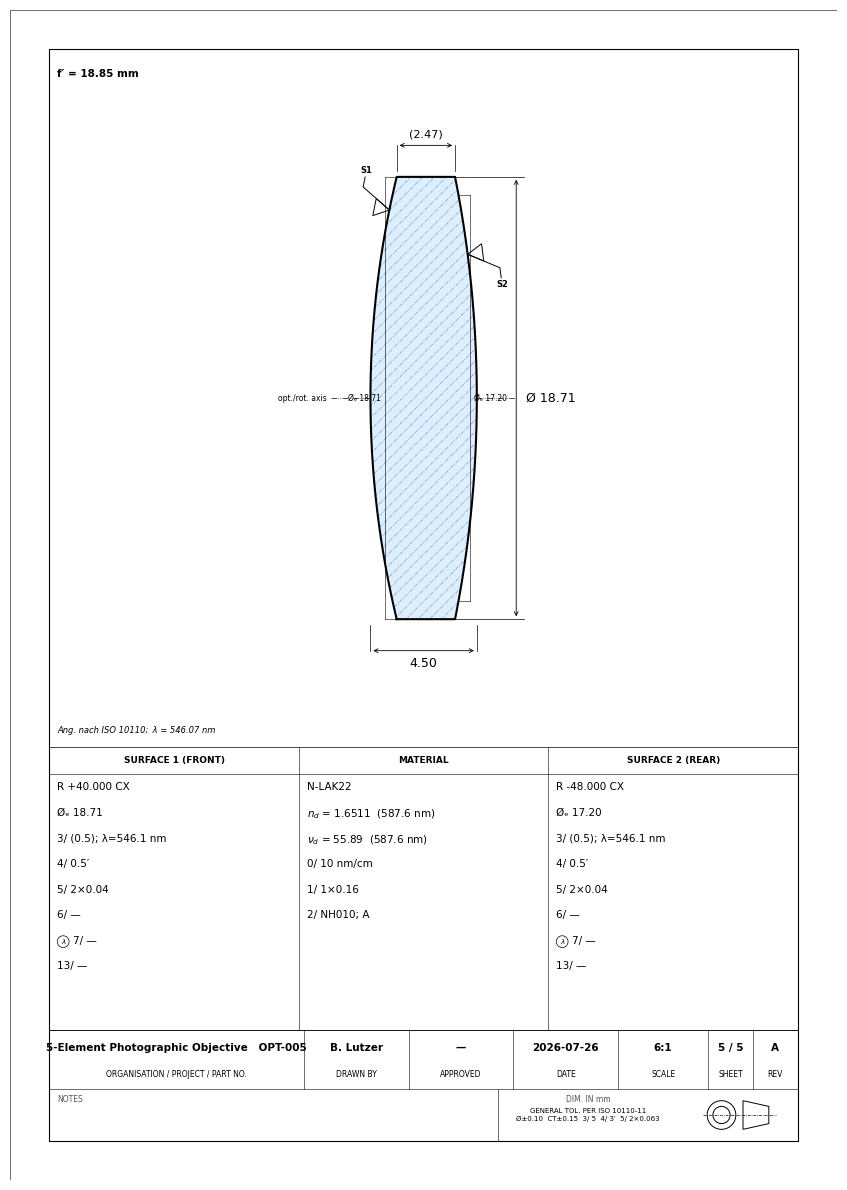
4.4 Preview — Elements 4 and 5#
[12]:
report.show(element_index=3, figsize=(16.5, 11.7))
report.show(element_index=4, figsize=(16.5, 11.7))
5. Export to DXF and PDF#
5.1 Export individual DXF files#
Each element gets its own DXF file, named after the project and element number. These files can be opened in any CAD tool (FreeCAD, QCAD, AutoCAD, etc.) and integrated into mechanical assembly drawings.
[13]:
output_dir = Path('iso10110_output')
dxf_paths = report.save_dxf(output_dir)

print('DXF files written:')
for p in dxf_paths:
    print(f'  {p}  ({p.stat().st_size / 1024:.1f} kB)')
DXF files written:
  iso10110_output/5-Element_Photographic_Objective_E01.dxf  (68.8 kB)
  iso10110_output/5-Element_Photographic_Objective_E02.dxf  (68.8 kB)
  iso10110_output/5-Element_Photographic_Objective_E03.dxf  (101.1 kB)
  iso10110_output/5-Element_Photographic_Objective_E04.dxf  (68.8 kB)
  iso10110_output/5-Element_Photographic_Objective_E05.dxf  (68.8 kB)
5.2 Export combined multi-page PDF#
All five element drawings are combined into a single A3 PDF — ready to send to the lens manufacturer.
[14]:
pdf_path = output_dir / '5element_photographic_objective_drawings.pdf'
report.save_pdf(pdf_path, combined=True)
print(f'Combined PDF: {pdf_path}  ({pdf_path.stat().st_size / 1024:.1f} kB)')
Combined PDF: iso10110_output/5element_photographic_objective_drawings.pdf (121.5 kB)
5.3 Export individual PDFs per element#
[15]:
report.save_pdf(output_dir / 'individual', combined=False)
print('Individual PDFs:')
for p in sorted((output_dir / 'individual').glob('*.pdf')):
    print(f'  {p.name}  ({p.stat().st_size / 1024:.1f} kB)')
Individual PDFs:
  5-Element_Photographic_Objective_E01.pdf  (57.3 kB)
  5-Element_Photographic_Objective_E02.pdf  (55.6 kB)
  5-Element_Photographic_Objective_E03.pdf  (68.3 kB)
  5-Element_Photographic_Objective_E04.pdf  (55.5 kB)
  5-Element_Photographic_Objective_E05.pdf  (55.1 kB)
6. Working with Individual Drawings#
You can also create and customise a single element drawing directly.
[16]:
from optiland.iso10110 import ElementDrawing

# Grab the cemented doublet (element index 2)
cemented_elem = spec.elements[2]
d = ElementDrawing(cemented_elem, spec, element_index=2)
doc = d.generate()

# Access the raw ezdxf document for custom modifications
msp = doc.modelspace()
print(f'Modelspace entity count: {len(list(msp))}')

# Save standalone
d.save_dxf(output_dir / 'cemented_doublet_OPT003.dxf')
d.save_pdf(output_dir / 'cemented_doublet_OPT003.pdf')
print('Saved standalone cemented doublet drawing.')
Modelspace entity count: 146
Saved standalone cemented doublet drawing.
7. Customising Font Sizes and Layout#
By default, every drawing uses a fixed set of font sizes and a fixed sheet border margin. DrawingStyle exposes these as named, multiplicative scale factors (plus an absolute border_margin in mm) so they can be adjusted without touching the renderer source — useful if your printer renders small text faintly, or your house style prefers a larger spec table.
Every factor defaults to 1.0, reproducing the built-in appearance exactly; pass only the fields you want to change. The same DrawingStyle instance applies uniformly to both the PDF/PNG (matplotlib) and DXF output.
[17]:
from optiland.iso10110 import DrawingStyle

# Enlarge the spec-table text and the CT/Ø dimension callouts by 30%,
# and shrink the sheet border margin slightly to make room.
custom_style = DrawingStyle(
    table_body_scale=1.3,
    dimension_scale=1.3,
    border_margin=8.0,
)

d_custom = ElementDrawing(cemented_elem, spec, element_index=2, style=custom_style)
d_custom.show(figsize=(16.5, 11.7))
8. Summary#
The optiland.iso10110 module provides:
Component |
Role |
|---|---|
|
Infers singlets / cemented doublets from surface sequence |
|
Annotation overlay: attaches ISO 10110 tolerances to the optic |
|
Per-surface: form error |
|
Per-element: birefringence |
|
Sets the ISO 10110 optical-quality fields of |
|
Sets the title-block fields of |
|
Font-size scale factors and border margin for both renderers (see §7) |
|
Single-element drawing (PDF, PNG, DXF) |
|
Batches all elements → DXF files + multi-page PDF |
Output formats:
DXF (needs
optiland[manufacturing]) — opens in FreeCAD, QCAD, AutoCAD; can be embedded in mechanical assembly drawingsPDF / PNG — rendered with matplotlib; suitable for documentation and sign-off
Limitations: element inference groups surfaces by glass/air transitions, so reflective (mirror) surfaces and images immersed in a non-air medium are not supported yet (a UserWarning is emitted).