Simple Optimization
Automatically refine lens parameters to minimize aberrations.
Introduction
This tutorial shows how to optimize optical systems in Optiland. In this example, we will optimize a singlet.
Core concepts used
f2 (focal length) or OPD_difference (wavefront quality).Step-by-step build
Import libraries
import numpy as np

from optiland import analysis, optic, optimization, wavefrontBuild the initial singlet and inspect layout
We first define a simple singlet. We will make it double convex and will define a few fields and wavelengths.
lens = optic.Optic()

# add surfaces
lens.add_surface(index=0, thickness=np.inf)
lens.add_surface(index=1, thickness=5, radius=100, is_stop=True, material="N-SF11")
lens.add_surface(index=2, thickness=59, radius=-1000)
lens.add_surface(index=3)

# add aperture
lens.set_aperture(aperture_type="EPD", value=25)

# add field
lens.set_field_type(field_type="angle")
lens.add_field(y=0.0)
lens.add_field(y=0.7)
lens.add_field(y=1.0)

# add wavelength
lens.add_wavelength(value=0.4861)
lens.add_wavelength(value=0.5876, is_primary=True)
lens.add_wavelength(value=0.6563)

lens.update_paraxial()lens.draw()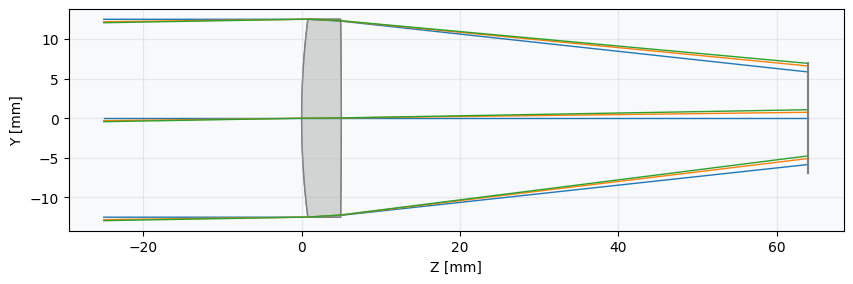
Define the optimisation problem
Now, we need to define the optimization problem, which contains all information about the variables and operands.
In particular, we will optimize for minimal optical path difference for each field. We will also add an operand to specify the focal length at 100 mm. As for variables, we will let the lens radii vary and the distance from the lens to the image plane. Once defined, we can view all information related to the optimization problem using the 'info' method.
There are many operand types available, which can be seen in optiland.operand. Variable options can be seen in optiland.variable,
problem = optimization.OptimizationProblem()

for wave in lens.wavelengths.get_wavelengths():
 for Hx, Hy in lens.fields.get_field_coords():
     input_data = {
         "optic": lens,
         "Hx": Hx,
         "Hy": Hy,
         "num_rays": 3,
         "wavelength": wave,
         "distribution": "gaussian_quad",
     }
     problem.add_operand(
         operand_type="OPD_difference",
         target=0,
         weight=1,
         input_data=input_data,
     )

problem.add_operand(
 operand_type="f2",
 target=100,
 weight=10,
 input_data={"optic": lens},
)

problem.add_variable(lens, "thickness", surface_number=2, min_val=0, max_val=1000)
problem.add_variable(lens, "radius", surface_number=1, min_val=-1000, max_val=1000)
problem.add_variable(lens, "radius", surface_number=2, min_val=-1000, max_val=1000)

problem.info()Create the optimizer
We now need to define an optimizer, which will take the optimization problem as an input. We choose the standard "generic" optimizer, but there are many other options, including a least squares optimizer.
Note that the generic optimizer simply utilizes scipy.optimize.minimize.
optimizer = optimization.OptimizerGeneric(problem)

# We can also use a least squares optimizer as follows:
# optimizer = optimization.LeastSquares(problem)Run the optimiser and review results
We can now simply call the optimizer.
res = optimizer.optimize()If we now view the optimization problem info, we can see that we've significantly improved the system (>99.9%)
problem.info()Inspect the optimised lens layout
And when we view the lens, we see that it properly focuses the light on our image plane.
lens.draw()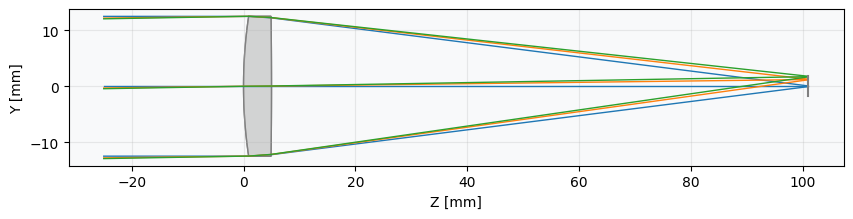
Analyse ray aberrations
Let's look at a few other common analyes:
fan = analysis.RayFan(lens)
fan.view()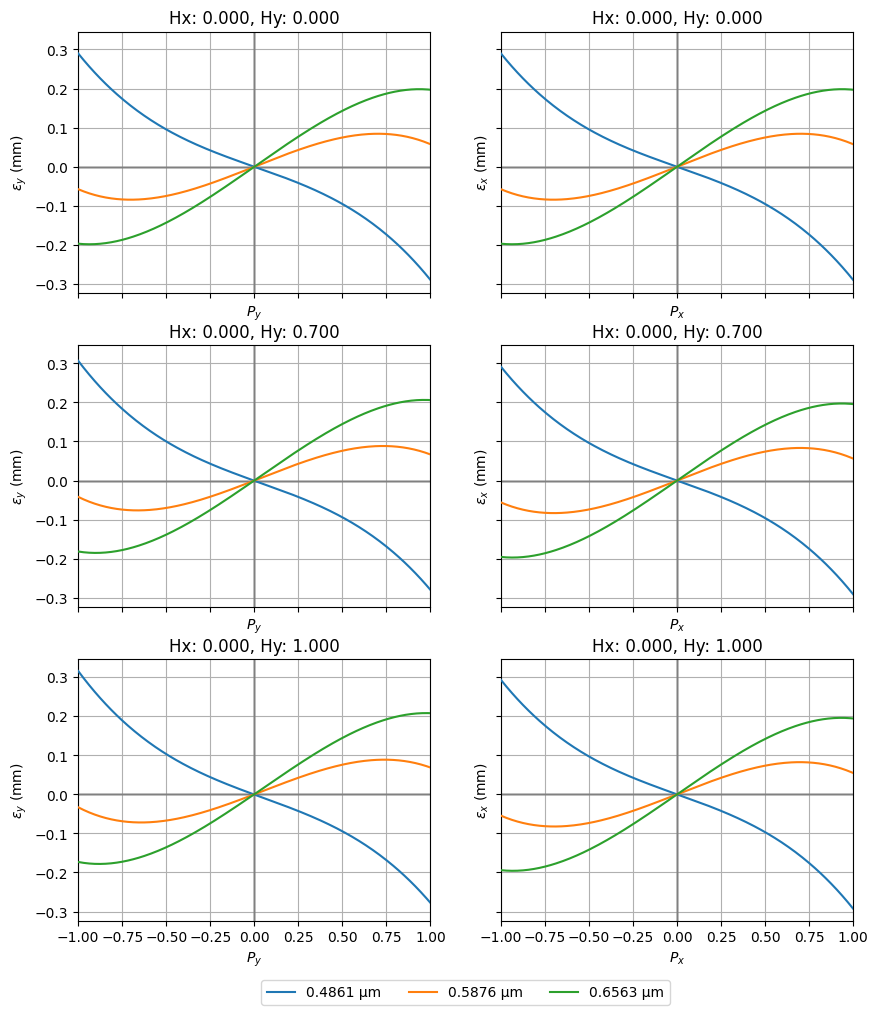
spot = analysis.SpotDiagram(lens)
spot.view()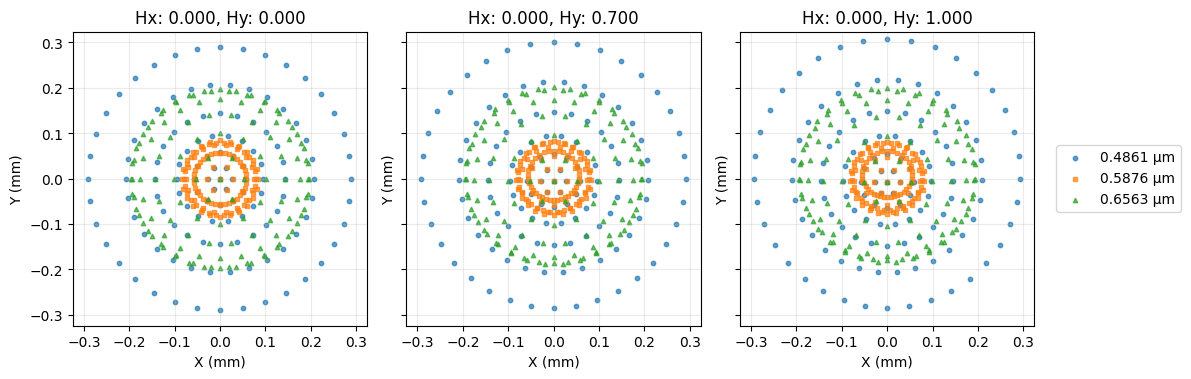
Visualise the wavefront OPD
opd = wavefront.OPD(lens, field=(0, 1), wavelength=0.55)
opd.view(projection="2d", num_points=512)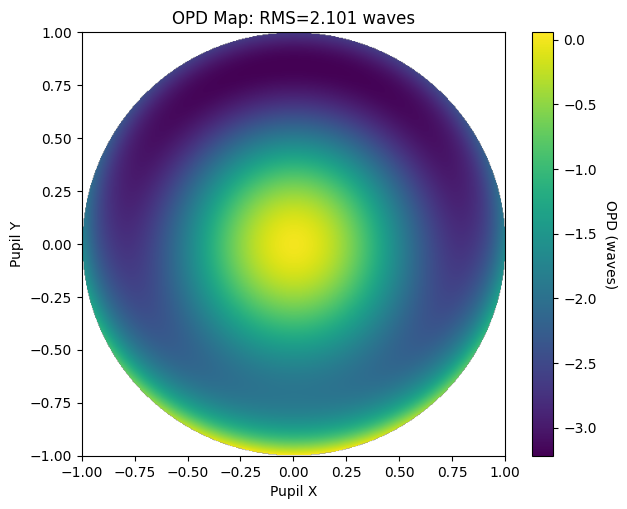
Show full code listing
import numpy as np

from optiland import analysis, optic, optimization, wavefront

lens = optic.Optic()

# add surfaces
lens.add_surface(index=0, thickness=np.inf)
lens.add_surface(index=1, thickness=5, radius=100, is_stop=True, material="N-SF11")
lens.add_surface(index=2, thickness=59, radius=-1000)
lens.add_surface(index=3)

# add aperture
lens.set_aperture(aperture_type="EPD", value=25)

# add field
lens.set_field_type(field_type="angle")
lens.add_field(y=0.0)
lens.add_field(y=0.7)
lens.add_field(y=1.0)

# add wavelength
lens.add_wavelength(value=0.4861)
lens.add_wavelength(value=0.5876, is_primary=True)
lens.add_wavelength(value=0.6563)

lens.update_paraxial()

lens.draw()

problem = optimization.OptimizationProblem()

for wave in lens.wavelengths.get_wavelengths():
  for Hx, Hy in lens.fields.get_field_coords():
      input_data = {
          "optic": lens,
          "Hx": Hx,
          "Hy": Hy,
          "num_rays": 3,
          "wavelength": wave,
          "distribution": "gaussian_quad",
      }
      problem.add_operand(
          operand_type="OPD_difference",
          target=0,
          weight=1,
          input_data=input_data,
      )

problem.add_operand(
  operand_type="f2",
  target=100,
  weight=10,
  input_data={"optic": lens},
)

problem.add_variable(lens, "thickness", surface_number=2, min_val=0, max_val=1000)
problem.add_variable(lens, "radius", surface_number=1, min_val=-1000, max_val=1000)
problem.add_variable(lens, "radius", surface_number=2, min_val=-1000, max_val=1000)

problem.info()

optimizer = optimization.OptimizerGeneric(problem)

# We can also use a least squares optimizer as follows:
# optimizer = optimization.LeastSquares(problem)

res = optimizer.optimize()

problem.info()

lens.draw()

fan = analysis.RayFan(lens)
fan.view()

spot = analysis.SpotDiagram(lens)
spot.view()

opd = wavefront.OPD(lens, field=(0, 1), wavelength=0.55)
opd.view(projection="2d", num_points=512)
Conclusions
- Defined a least-squares optimization problem by specifying operands for effective focal length, Seidel aberrations (S1–S4), and RMS spot size, then adding surface radii as free variables.
- Used
OptimizerGenericwith theleast_squaresmethod to drive the singlet toward a diffraction-limited design in a single call. - Inspected convergence with
problem.info()and confirmed the optimized prescription numerically. - Verified the improved performance visually using
RayFan,SpotDiagram, and a 2D OPD map, observing the reduction in aberration residuals compared to the starting design.
Next tutorials
Original notebook: Tutorial_5a_Simple_Optimization.ipynb on GitHub · ReadTheDocs