Raytracing Aspheres
Model components with non-spherical profiles for high-performance optics.
Introduction
This tutorial shows how even aspheres can be modeled in Optiland. We will first assess a simple spherical lens, then compare it to an even asphere.
Core concepts used
Step-by-step build
Import libraries
import numpy as np

from optiland import analysis, opticBuild and analyse the spherical singlet
Let's define a simple singlet:
spherical = optic.Optic()

# add surfaces
spherical.add_surface(index=0, radius=np.inf, thickness=np.inf)
spherical.add_surface(
 index=1,
 thickness=7,
 radius=20.0,
 is_stop=True,
 material="N-SF11",
)
spherical.add_surface(index=2, thickness=21.56201105)
spherical.add_surface(index=3)

# add aperture
spherical.set_aperture(aperture_type="EPD", value=20.0)

# add field
spherical.set_field_type(field_type="angle")
spherical.add_field(y=0)

# add wavelength
spherical.add_wavelength(value=0.587, is_primary=True)

spherical.update_paraxial()

spherical.draw(num_rays=10)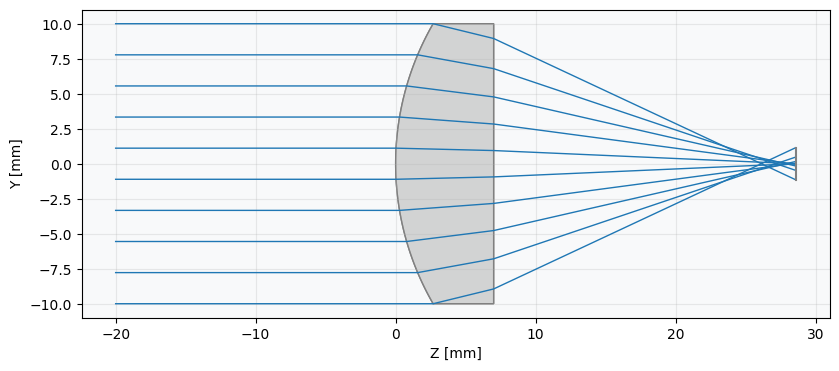
spot = analysis.SpotDiagram(spherical)
spot.view()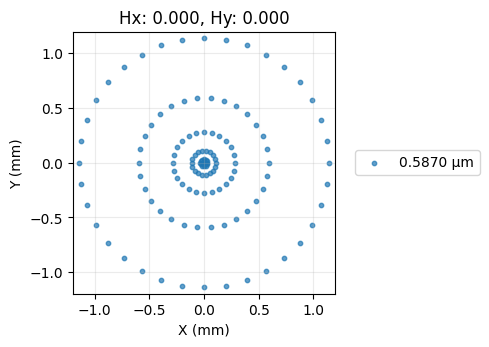
As we can see, this lens shows a significant amount of spherical aberration, as is typical for such a lens.
Build and analyse the aspheric singlet
Let's now define an asphere which has improved spherical aberration performance.
We define the "surface_type" attribute as "even_asphere" and we supply a list of coefficients of the aspheric terms. The aspheric surface sag equation is
where is the sag, is the radius of curvature, is the radial distance from the optical axis, and are the coefficients of the asphere. The coefficient list provided to the surface is simply .
asphere = optic.Optic()

# add surfaces
asphere.add_surface(index=0, radius=np.inf, thickness=np.inf)
asphere.add_surface(
 index=1,
 thickness=7,
 radius=20.0,
 is_stop=True,
 material="N-SF11",
 surface_type="even_asphere",
 conic=0.0,
 coefficients=[
     -2.248851e-4,
     -4.690412e-6,
     -6.404376e-8,
 ],  # <-- coefficients for asphere
)
asphere.add_surface(index=2, thickness=21.56201105)
asphere.add_surface(index=3)

# add aperture
asphere.set_aperture(aperture_type="EPD", value=20.0)

# add field
asphere.set_field_type(field_type="angle")
asphere.add_field(y=0)

# add wavelength
asphere.add_wavelength(value=0.587, is_primary=True)

asphere.update_paraxial()

asphere.draw(num_rays=5)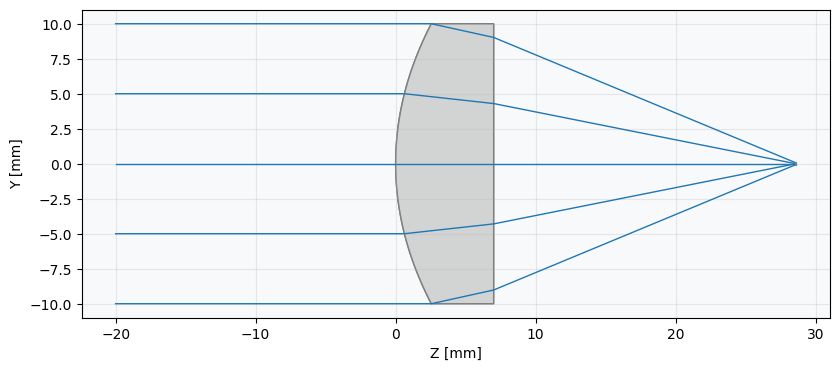
spot = analysis.SpotDiagram(asphere)
spot.view()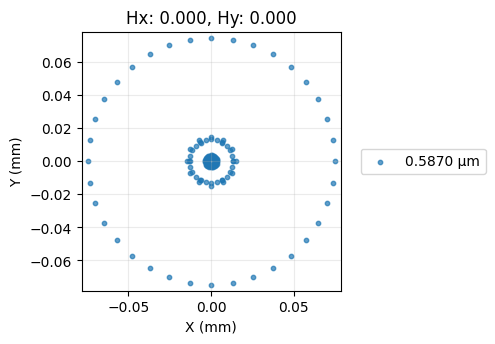
Show full code listing
import numpy as np

from optiland import analysis, optic

spherical = optic.Optic()

# add surfaces
spherical.add_surface(index=0, radius=np.inf, thickness=np.inf)
spherical.add_surface(
  index=1,
  thickness=7,
  radius=20.0,
  is_stop=True,
  material="N-SF11",
)
spherical.add_surface(index=2, thickness=21.56201105)
spherical.add_surface(index=3)

# add aperture
spherical.set_aperture(aperture_type="EPD", value=20.0)

# add field
spherical.set_field_type(field_type="angle")
spherical.add_field(y=0)

# add wavelength
spherical.add_wavelength(value=0.587, is_primary=True)

spherical.update_paraxial()

spherical.draw(num_rays=10)

spot = analysis.SpotDiagram(spherical)
spot.view()

asphere = optic.Optic()

# add surfaces
asphere.add_surface(index=0, radius=np.inf, thickness=np.inf)
asphere.add_surface(
  index=1,
  thickness=7,
  radius=20.0,
  is_stop=True,
  material="N-SF11",
  surface_type="even_asphere",
  conic=0.0,
  coefficients=[
      -2.248851e-4,
      -4.690412e-6,
      -6.404376e-8,
  ],  # <-- coefficients for asphere
)
asphere.add_surface(index=2, thickness=21.56201105)
asphere.add_surface(index=3)

# add aperture
asphere.set_aperture(aperture_type="EPD", value=20.0)

# add field
asphere.set_field_type(field_type="angle")
asphere.add_field(y=0)

# add wavelength
asphere.add_wavelength(value=0.587, is_primary=True)

asphere.update_paraxial()

asphere.draw(num_rays=5)

spot = analysis.SpotDiagram(asphere)
spot.view()
Conclusions
We can see that the rays now focus much closer to the optical axis and that the spot size has reduced significantly.
Conclusions:
- This tutorial introduced the even asphere surface type.
- To use an aspheric surface, we simply specify surface_type='even_asphere' and provide the list of aspheric coefficients.
This tutorial used an asphere that had alredy been optimized for minimal wavefront error. We ignored these details here, but future tutorials will elaborate on the asphere optimization process.
Next tutorials
Original notebook: Tutorial_2d_Raytracing_Aspheres.ipynb on GitHub · ReadTheDocs