Multi-Configuration Zoom Lens
Learn how to handle lenses that change their state and geometry.
Introduction
This example demonstrates how to create, visualize, and optimize a multi-configuration zoom lens system using the MultiConfiguration class.
Core concepts used
Step-by-step build
Import NumPy and the Optic class
import numpy as np
from optiland.optic import Optic
from optiland.multiconfig import MultiConfiguration
from optiland.optimization import OptimizationProblem
from optiland.optimization import LeastSquaresDefine the Base Optical System
First, we define the base optical system (Configuration 0). This system represents the first zoom position.
Design reference: Milton Laikin, Lens Design, 2007, Pg. 362. Note this design is in inches = 25.4 mm.
# Initialize the Optic
lens = Optic()

# Define Wavelengths (Standard Visible)
lens.add_wavelength(value=0.4861)  # F
lens.add_wavelength(value=0.5876, is_primary=True)  # d
lens.add_wavelength(value=0.6563)  # C

# Define Fields (On-axis and Edge)
lens.set_field_type("angle")
lens.add_field(y=0)
lens.add_field(y=14.93)
lens.add_field(y=28.07)

# Define Aperture
lens.set_aperture("imageFNO", 2.4)

# --- Surface Definition ---
# Note: Base configuration uses values for the first zoom position (EFL 0.591)

lens.add_surface(index=0, radius=np.inf, thickness=np.inf)
lens.add_surface(
 index=1, radius=10.0697, thickness=1.2211, material="N-LAK9", aperture=5.8
)
lens.add_surface(
 index=2, radius=-6.2327, thickness=0.2360, material="SF5", aperture=5.8
)
lens.add_surface(index=3, radius=15.1603, thickness=0.0150, aperture=5.38)
lens.add_surface(
 index=4, radius=6.0741, thickness=0.4336, material="N-LAF21", aperture=5.26
)
lens.add_surface(index=5, radius=12.9033, thickness=0.0903, aperture=5.2) # Variable T
lens.add_surface(
 index=6, radius=41.2877, thickness=0.1400, material="N-LAK9", aperture=2.42
)
lens.add_surface(index=7, radius=1.7269, thickness=0.4613, aperture=2.0)
lens.add_surface(
 index=8, radius=-3.8953, thickness=0.1400, material="N-LAK9", aperture=2.0
)
lens.add_surface(
 index=9, radius=1.2599, thickness=0.5386, material="SF5", aperture=1.96
)
lens.add_surface(
 index=10, radius=-43.9995, thickness=5.7197, aperture=1.96  # Variable T
)
lens.add_surface(
 index=11, radius=3.4298, thickness=0.3125, material="N-LAK9", aperture=1.8
)
lens.add_surface(index=12, radius=-4.9794, thickness=0.0150, aperture=1.8)
lens.add_surface(
 index=13, radius=1.6004, thickness=0.1698, material="SF1", aperture=1.68
)
lens.add_surface(
 index=14, radius=0.7220, thickness=0.4947, material="N-LAK9", aperture=1.38
)
lens.add_surface(index=15, radius=6.9314, thickness=0.0090, aperture=1.38) # Variable T
lens.add_surface(index=16, radius=np.inf, thickness=0.2934, is_stop=True)
lens.add_surface(
 index=17, radius=-1.2083, thickness=0.1191, material="N-LAK8", aperture=0.66
)
lens.add_surface(
 index=18, radius=-2.8138, thickness=0.0984, material="SF1", aperture=0.7
)
lens.add_surface(index=19, radius=1.9740, thickness=0.0659, aperture=0.7)
lens.add_surface(
 index=20, radius=-2.5527, thickness=0.3367, material="N-SF8", aperture=0.7
)
lens.add_surface(index=21, radius=-0.8716, thickness=0.0200, aperture=0.86)
lens.add_surface(
 index=22, radius=1.9698, thickness=0.2970, material="N-BAK4", aperture=0.88
)
lens.add_surface(
 index=23, radius=-0.7692, thickness=0.1000, material="SF1", aperture=0.88
)
lens.add_surface(index=24, radius=-3.7908, thickness=0.9232, aperture=0.88)
lens.add_surface(index=25, radius=np.inf, thickness=0.0)

lens.set_ray_aiming("iterative", cache=True)Create Multi-Configuration Setup
We now initialize the MultiConfiguration object. The base optic is automatically assigned as Configuration 0.
We then add three additional configurations for different zoom positions. Both zoom positions and fields are defined for each additional configuration. In general, any property of the optic can be defined for any configuration.
# Multi-Configuration Setup
mc = MultiConfiguration(lens)

# Configuration 0 is the base (lens)
# Values are already set for Config 0 (EFL 0.591)

# Configuration 1 (EFL 1.272)
mc.add_configuration()
mc.set_thickness(surface_index=5, value=2.4124, configurations=[1])
mc.set_thickness(surface_index=10, value=3.2501, configurations=[1])
mc.set_thickness(surface_index=15, value=0.1566, configurations=[1])
# Update fields for configuration 1
mc.set_optic_property(
 attribute_path="fields.fields[1].y", value=7.05, configurations=[1])
mc.set_optic_property(
 attribute_path="fields.fields[2].y", value=13.9, configurations=[1])

# Configuration 2 (EFL 2.741)
mc.add_configuration()
mc.set_thickness(surface_index=5, value=4.0081, configurations=[2])
mc.set_thickness(surface_index=10, value=1.4376, configurations=[2])
mc.set_thickness(surface_index=15, value=0.3733, configurations=[2])
# Update fields for configuration 2
mc.set_optic_property(
 attribute_path="fields.fields[1].y", value=3.288, configurations=[2])
mc.set_optic_property(
 attribute_path="fields.fields[2].y", value=6.555, configurations=[2])

# Configuration 3 (EFL 5.905)
mc.add_configuration()
mc.set_thickness(surface_index=5, value=5.1199, configurations=[3])
mc.set_thickness(surface_index=10, value=0.0100, configurations=[3])
mc.set_thickness(surface_index=15, value=0.6891, configurations=[3])
# Update fields for configuration 3
mc.set_optic_property(
 attribute_path="fields.fields[1].y", value=1.528, configurations=[3])
mc.set_optic_property(
 attribute_path="fields.fields[2].y", value=3.053, configurations=[3])

for config in mc.configurations:
config.scale_system(25.4) # Scale each config to metricVisualize the Configurations
We can visualize all configurations side-by-side using the draw method.
_ = mc.draw()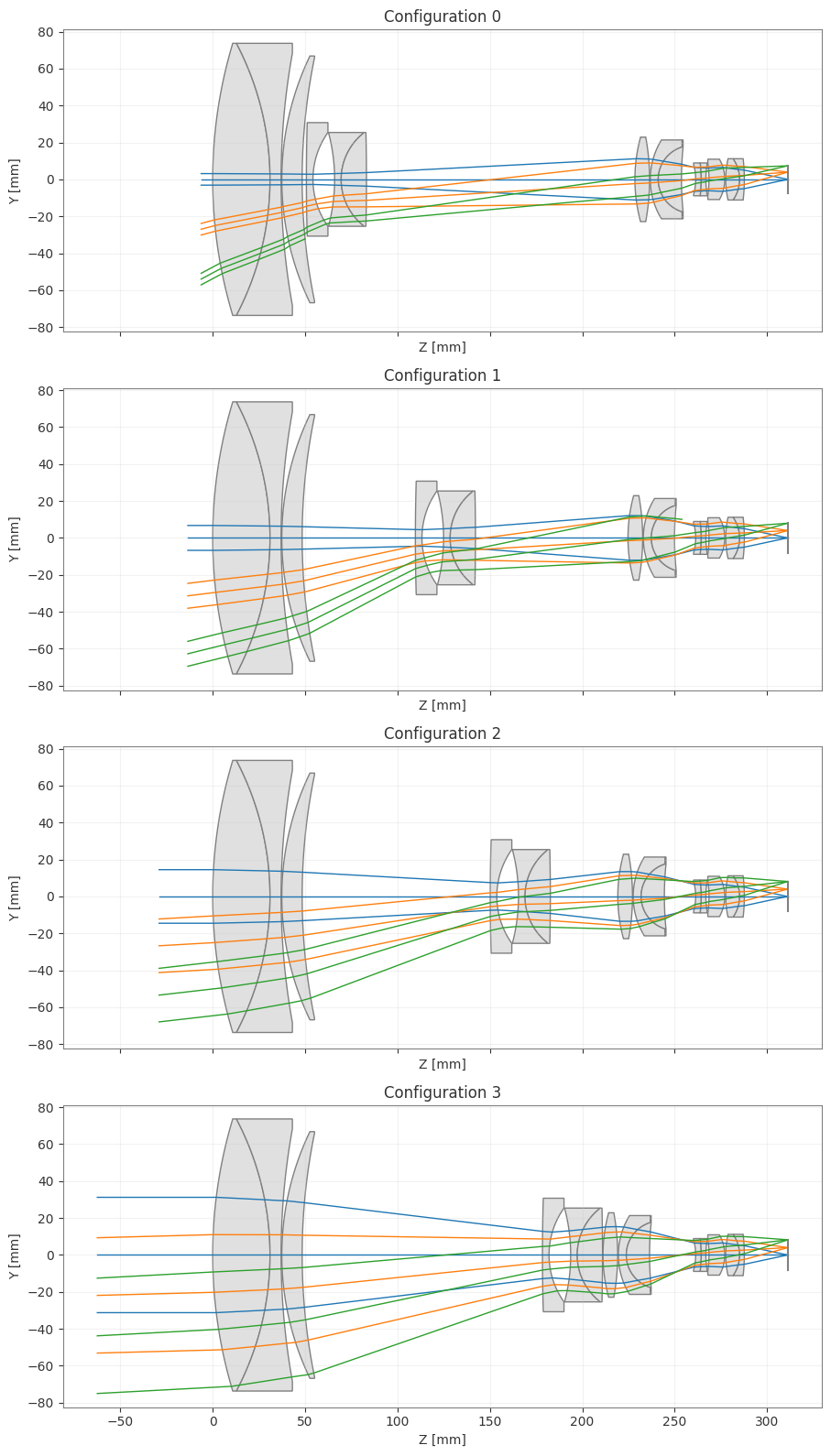
Optimization
We can optimize the system by defining variables and operands. In a multi-configuration system, variables can be applied to common surfaces (affecting all configurations due to pickups) or to specific independent parameters.
Here, we demonstrate a simple optimization setup.
problem = OptimizationProblem()

# 1. Add Variables
# Optimize radius of surface 1. Since other configurations are linked to this surface
# by default (via pickups), optimizing the base optic affects all configurations.
problem.add_variable(
 optic=mc.configurations[0], variable_type='radius', surface_number=1
)

# Optimize the spacing after surface 5 for Configuration 1
problem.add_variable(
 optic=mc.configurations[1], variable_type='thickness', surface_number=5
)

# 2. Add Operands
# Target EFL for Config 0
problem.add_operand(
 operand_type='f2', target=0.591*25.4, weight=1.0,
 input_data={'optic': mc.configurations[0]}
)
# Target EFL for Config 1
problem.add_operand(
 operand_type='f2', target=1.272*25.4, weight=1.0,
 input_data={'optic': mc.configurations[1]}
)

# 3. Run Optimization
optimizer = LeastSquares(problem)
optimizer.optimize(maxiter=5)

# Check results
problem.info()Draw the final optimized configuration
# View the final design for configuration 3
_ = mc.configurations[3].draw()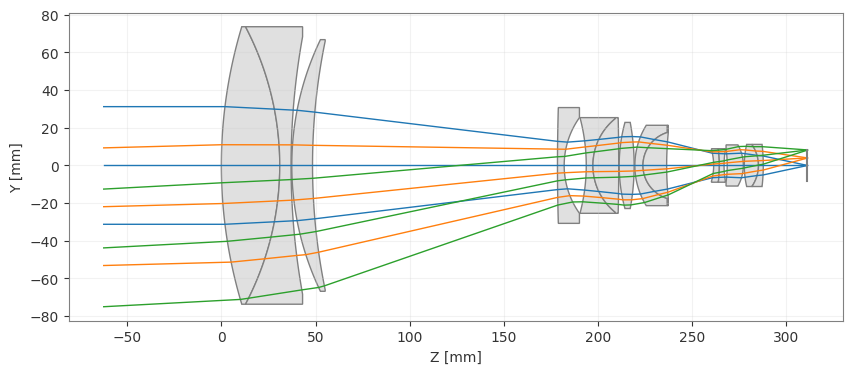
Show full code listing
import numpy as np
from optiland.optic import Optic
from optiland.multiconfig import MultiConfiguration
from optiland.optimization import OptimizationProblem
from optiland.optimization import LeastSquares

# Initialize the Optic
lens = Optic()

# Define Wavelengths (Standard Visible)
lens.add_wavelength(value=0.4861)  # F
lens.add_wavelength(value=0.5876, is_primary=True)  # d
lens.add_wavelength(value=0.6563)  # C

# Define Fields (On-axis and Edge)
lens.set_field_type("angle")
lens.add_field(y=0)
lens.add_field(y=14.93)
lens.add_field(y=28.07)

# Define Aperture
lens.set_aperture("imageFNO", 2.4)

# --- Surface Definition ---
# Note: Base configuration uses values for the first zoom position (EFL 0.591)

lens.add_surface(index=0, radius=np.inf, thickness=np.inf)
lens.add_surface(
  index=1, radius=10.0697, thickness=1.2211, material="N-LAK9", aperture=5.8
)
lens.add_surface(
  index=2, radius=-6.2327, thickness=0.2360, material="SF5", aperture=5.8
)
lens.add_surface(index=3, radius=15.1603, thickness=0.0150, aperture=5.38)
lens.add_surface(
  index=4, radius=6.0741, thickness=0.4336, material="N-LAF21", aperture=5.26
)
lens.add_surface(index=5, radius=12.9033, thickness=0.0903, aperture=5.2) # Variable T
lens.add_surface(
  index=6, radius=41.2877, thickness=0.1400, material="N-LAK9", aperture=2.42
)
lens.add_surface(index=7, radius=1.7269, thickness=0.4613, aperture=2.0)
lens.add_surface(
  index=8, radius=-3.8953, thickness=0.1400, material="N-LAK9", aperture=2.0
)
lens.add_surface(
  index=9, radius=1.2599, thickness=0.5386, material="SF5", aperture=1.96
)
lens.add_surface(
  index=10, radius=-43.9995, thickness=5.7197, aperture=1.96  # Variable T
)
lens.add_surface(
  index=11, radius=3.4298, thickness=0.3125, material="N-LAK9", aperture=1.8
)
lens.add_surface(index=12, radius=-4.9794, thickness=0.0150, aperture=1.8)
lens.add_surface(
  index=13, radius=1.6004, thickness=0.1698, material="SF1", aperture=1.68
)
lens.add_surface(
  index=14, radius=0.7220, thickness=0.4947, material="N-LAK9", aperture=1.38
)
lens.add_surface(index=15, radius=6.9314, thickness=0.0090, aperture=1.38) # Variable T
lens.add_surface(index=16, radius=np.inf, thickness=0.2934, is_stop=True)
lens.add_surface(
  index=17, radius=-1.2083, thickness=0.1191, material="N-LAK8", aperture=0.66
)
lens.add_surface(
  index=18, radius=-2.8138, thickness=0.0984, material="SF1", aperture=0.7
)
lens.add_surface(index=19, radius=1.9740, thickness=0.0659, aperture=0.7)
lens.add_surface(
  index=20, radius=-2.5527, thickness=0.3367, material="N-SF8", aperture=0.7
)
lens.add_surface(index=21, radius=-0.8716, thickness=0.0200, aperture=0.86)
lens.add_surface(
  index=22, radius=1.9698, thickness=0.2970, material="N-BAK4", aperture=0.88
)
lens.add_surface(
  index=23, radius=-0.7692, thickness=0.1000, material="SF1", aperture=0.88
)
lens.add_surface(index=24, radius=-3.7908, thickness=0.9232, aperture=0.88)
lens.add_surface(index=25, radius=np.inf, thickness=0.0)

lens.set_ray_aiming("iterative", cache=True)

# Multi-Configuration Setup
mc = MultiConfiguration(lens)

# Configuration 0 is the base (lens)
# Values are already set for Config 0 (EFL 0.591)

# Configuration 1 (EFL 1.272)
mc.add_configuration()
mc.set_thickness(surface_index=5, value=2.4124, configurations=[1])
mc.set_thickness(surface_index=10, value=3.2501, configurations=[1])
mc.set_thickness(surface_index=15, value=0.1566, configurations=[1])
# Update fields for configuration 1
mc.set_optic_property(
  attribute_path="fields.fields[1].y", value=7.05, configurations=[1])
mc.set_optic_property(
  attribute_path="fields.fields[2].y", value=13.9, configurations=[1])

# Configuration 2 (EFL 2.741)
mc.add_configuration()
mc.set_thickness(surface_index=5, value=4.0081, configurations=[2])
mc.set_thickness(surface_index=10, value=1.4376, configurations=[2])
mc.set_thickness(surface_index=15, value=0.3733, configurations=[2])
# Update fields for configuration 2
mc.set_optic_property(
  attribute_path="fields.fields[1].y", value=3.288, configurations=[2])
mc.set_optic_property(
  attribute_path="fields.fields[2].y", value=6.555, configurations=[2])

# Configuration 3 (EFL 5.905)
mc.add_configuration()
mc.set_thickness(surface_index=5, value=5.1199, configurations=[3])
mc.set_thickness(surface_index=10, value=0.0100, configurations=[3])
mc.set_thickness(surface_index=15, value=0.6891, configurations=[3])
# Update fields for configuration 3
mc.set_optic_property(
  attribute_path="fields.fields[1].y", value=1.528, configurations=[3])
mc.set_optic_property(
  attribute_path="fields.fields[2].y", value=3.053, configurations=[3])

for config in mc.configurations:
  config.scale_system(25.4)  # Scale each config to metric

_ = mc.draw()

problem = OptimizationProblem()

# 1. Add Variables
# Optimize radius of surface 1. Since other configurations are linked to this surface
# by default (via pickups), optimizing the base optic affects all configurations.
problem.add_variable(
  optic=mc.configurations[0], variable_type='radius', surface_number=1
)

# Optimize the spacing after surface 5 for Configuration 1
problem.add_variable(
  optic=mc.configurations[1], variable_type='thickness', surface_number=5
)

# 2. Add Operands
# Target EFL for Config 0
problem.add_operand(
  operand_type='f2', target=0.591*25.4, weight=1.0,
  input_data={'optic': mc.configurations[0]}
)
# Target EFL for Config 1
problem.add_operand(
  operand_type='f2', target=1.272*25.4, weight=1.0,
  input_data={'optic': mc.configurations[1]}
)

# 3. Run Optimization
optimizer = LeastSquares(problem)
optimizer.optimize(maxiter=5)

# Check results
problem.info()

# View the final design for configuration 3
_ = mc.configurations[3].draw()
Conclusions
- The
MultiConfigurationclass was used to model a real zoom lens (from Milton Laikin's reference design) across four distinct focal-length positions by overriding variable airspaces and field angles per configuration. - Scaling the system from inches to millimetres with
scale_system(25.4)demonstrated that Optiland's multi-configuration framework is unit-agnostic and integrates seamlessly with published lens data. - The
mc.draw()method rendered all four zoom configurations side-by-side in a single call, making it straightforward to verify layout continuity across zoom positions. - Optimization variables and operands were bound to specific configurations, showing how shared (pickup) parameters and configuration-independent parameters can coexist in the same
OptimizationProblem. - Viewing the final telephoto configuration individually confirmed that the optimized shared surface radius propagated correctly through the configuration pickup mechanism, validating the multi-configuration constraint system.
Next tutorials
Original notebook: Tutorial_7f_Multi_Configuration_Zoom_Lenses.ipynb on GitHub · ReadTheDocs