Differentiable Ray Tracing
Learn how Optiland's engine uses PyTorch to compute gradients through any system.
Introduction
This tutorial is a first practical example of differentiable ray tracing in Optiland. You will switch from the NumPy backend to PyTorch, expose geometric parameters as trainable tensors, and optimize a singlet lens directly with autograd.
The example is intentionally simple: minimize RMS spot radius by adjusting the two lens radii. That keeps the optimization loop readable while still demonstrating the full differentiable workflow.
Differentiable Ray Tracing - Basics
Differentiable ray tracing (DRT) offers some notable advantages over traditional methodologies - especially when it comes to optimization. Conventional approaches generally involve applying small perturbations to design parameters and running discrete ray-tracing simulations repeatedly to estimate gradients. In contrast, DRT integrates automatic differentiation to compute these gradients directly and more efficiently by constructing a computational graph of the ray tracing process and then applying backpropagation.
Therefore, with a fully differentiable ray tracing pipeline, all the necessary steps (from ray intersections to refraction to image formation), are performed keeping in mind automatic differentiation. By enabling everything to be computed in an automatic differentiation framework like PyTorch, we allow the software to directly compute the gradient of our final merit function with respect to all the design parameters, which in turn opens the door to the usage of standard gradient-based algorithms like GD, SGD, Adam, etc (as opposed to relying on the finite difference approximations of the Jacobian, as in the standard DLS optimization algorithm).
That being said, let's get started with the practical application!
Core concepts used
Step-by-step build
Import the backend interface
# Begin by importing the backend module instead of numpy or torch directly
import optiland.backend as beSwitch Optiland to the PyTorch backend
To switch to PyTorch:
# set backend
be.set_backend("torch")
be.set_device(
 "cpu"
)  # we will stick to cpu for now. "cuda" is also possible for GPU calculations.
print(be.get_precision())  # check the precision

# enable the gradient mode: to tell autograd to begin
# recording operations on a Tensor tensor
be.grad_mode.enable()Define the Singlet Lens Class
In this simple example, we are concerned with optimizing a singlet lens radii for achieving the smallest RMS spot size at a distance of 70 mm from the second surface of the lens.
from optiland.optic import Optic
from optiland.materials import Material
from optiland.analysis import SpotDiagram


class SingletConfigurable(Optic):
 """A configurable singlet lens."""

 def __init__(self, r1, r2, t2, material_name):
     super().__init__()
     ideal_material = Material(material_name)

     self.add_surface(index=0, radius=be.inf, thickness=be.inf)
     self.add_surface(
         index=1, thickness=7.0, radius=r1, is_stop=True, material=ideal_material
     )
     self.add_surface(index=2, radius=r2, thickness=t2)
     self.add_surface(index=3)

     self.set_aperture(aperture_type="EPD", value=25)

     self.set_field_type(field_type="angle")
     self.add_field(y=0.0)

     self.add_wavelength(value=0.55, is_primary=True)
Notice how you can build your singlet in a Class. This allows easy reproducibility and customization and extra calls.
Instantiate and inspect the initial lens
Let's have a look what the lens look like at the moment.
lens = SingletConfigurable(r1=70.0, r2=-70.0, t2=70.0, material_name="BK7")
lens.draw(num_rays=10)
lens.info()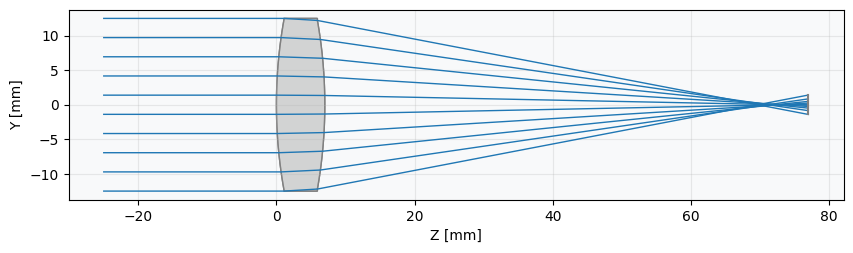
Measure the initial RMS spot size
It is clear that the image plane is far from the best focus. Recall that here we assume the "best focus" to be the smallest possible RMS spot size. And, speaking of, let's now check it's actual value:
# RMS Spot Size Analysis
spot_diagram = SpotDiagram(lens)
rms_value = spot_diagram.rms_spot_radius()
print(f"\nInitial RMS Spot Radius: {rms_value[0][0]:.4f} mm")

# Spot Diagram visualization
spot_diagram.view(add_airy_disk=True)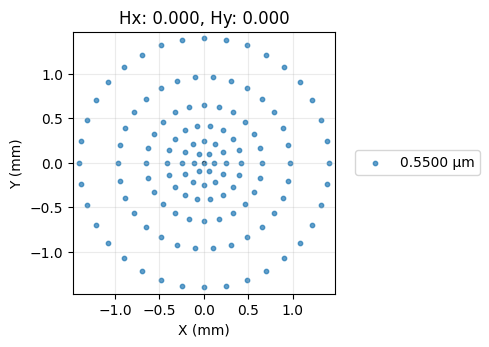
Set up for the optimization
Now, we set up the optimization to minimize the RMS spot size using PyTorch's autograd. We need to:
- Identify the parameters to optimize (Lens radii R1, R2).
- Define a PyTorch optimizer (e.g., Adam).
- Define the loss function (RMS spot radius).
import torch.optim as optim

# --- Parameter Handling ---

# Get initial values
radius1_param = lens.surface_group.surfaces[1].geometry.radius
radius2_param = lens.surface_group.surfaces[2].geometry.radius
params_to_optimize = [radius1_param, radius2_param]
print(params_to_optimize)Create the Adam optimizer
NOTE: When using the PyTorch backend with gradient mode enabled, Optiland allows direct access to certain geometric parameters (like surface radii) as tensors that participate in the computation graph. This enables us to pass them directly to a PyTorch optimizer.
# --- Optimizer ---
# We use the Adam optimizer, common for deep learning tasks.
# We pass the tensors we want to optimize.
learning_rate = 0.2  # Adjust as needed
optimizer = optim.Adam(params_to_optimize, lr=learning_rate)Run the differentiable optimization loop
# --- Loss Function ---
# The function to minimize is the RMS spot radius.
# We need a way to calculate this within the loop using the current tensor values.


def calculate_loss(lens):
 """Calculates the RMS spot radius for the current lens state."""
 rms_values_nested = SpotDiagram(lens).rms_spot_radius()
 rms_scalar = rms_values_nested[0][0]
 return rms_scalar


print("\nOptimization setup complete.")
print(f"Optimizing: R1, R2")
print(f"Initial values: (R1={radius1_param:.2f}, R2={radius2_param:.2f})")


# --- Optimization Loop ---
# We run the standard PyTorch training loop.

num_iterations = 100
print("\nStarting optimization...")
losses = []
for i in range(num_iterations):
 optimizer.zero_grad()

 # --- Calculate Loss ---
 loss = calculate_loss(lens)
 losses.append(loss.item())
 # --- Backpropagation and Optimization Step ---
 loss.backward()  # Calculate gradients
 optimizer.step()  # Update tensors based on gradients

 # --- Print Progress ---
 if (i + 1) % 25 == 0:
     print(
         f"Iteration {i + 1}/{num_iterations}, "
         f"Loss (RMS Spot Radius): {loss.item():.6f} mm"
     )
     print(f"  R1: {radius1_param.item():.4f}, R2: {radius2_param.item():.4f}")

print("Optimization finished.")Plot the loss history
# --- Visualization of Loss per Epoch ---
import matplotlib.pyplot as plt

plt.figure()
plt.plot(range(1, num_iterations + 1), losses)
plt.xlabel("Iteration")
plt.ylabel("Loss (RMS Spot Radius) [mm]")
plt.title("Loss per Iteration")
plt.grid(True)
plt.show()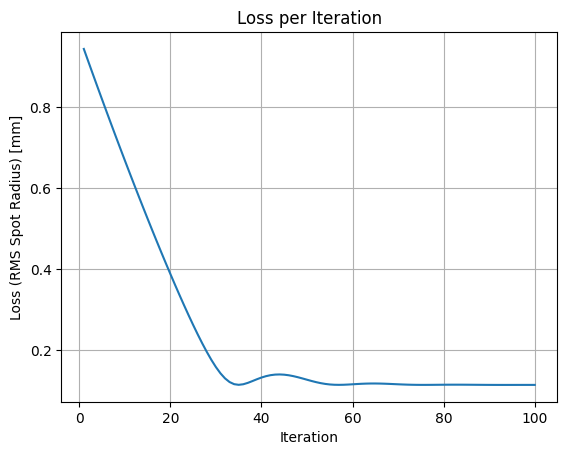
Verify the Optimized Spot Size
SpotDiagram(lens).view(add_airy_disk=True)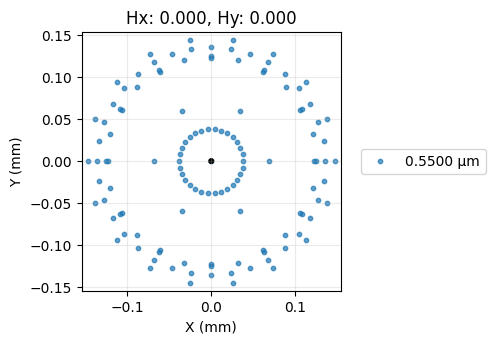
Show full code listing
# Begin by importing the backend module instead of numpy or torch directly
import optiland.backend as be

# set backend
be.set_backend("torch")
be.set_device(
  "cpu"
)  # we will stick to cpu for now. "cuda" is also possible for GPU calculations.
print(be.get_precision())  # check the precision

# enable the gradient mode: to tell autograd to begin
# recording operations on a Tensor tensor
be.grad_mode.enable()

from optiland.optic import Optic
from optiland.materials import Material
from optiland.analysis import SpotDiagram


class SingletConfigurable(Optic):
  """A configurable singlet lens."""

  def __init__(self, r1, r2, t2, material_name):
      super().__init__()
      ideal_material = Material(material_name)

      self.add_surface(index=0, radius=be.inf, thickness=be.inf)
      self.add_surface(
          index=1, thickness=7.0, radius=r1, is_stop=True, material=ideal_material
      )
      self.add_surface(index=2, radius=r2, thickness=t2)
      self.add_surface(index=3)

      self.set_aperture(aperture_type="EPD", value=25)

      self.set_field_type(field_type="angle")
      self.add_field(y=0.0)

      self.add_wavelength(value=0.55, is_primary=True)

lens = SingletConfigurable(r1=70.0, r2=-70.0, t2=70.0, material_name="BK7")
lens.draw(num_rays=10)
lens.info()

# RMS Spot Size Analysis
spot_diagram = SpotDiagram(lens)
rms_value = spot_diagram.rms_spot_radius()
print(f"\nInitial RMS Spot Radius: {rms_value[0][0]:.4f} mm")

# Spot Diagram visualization
spot_diagram.view(add_airy_disk=True)

import torch.optim as optim

# --- Parameter Handling ---

# Get initial values
radius1_param = lens.surface_group.surfaces[1].geometry.radius
radius2_param = lens.surface_group.surfaces[2].geometry.radius
params_to_optimize = [radius1_param, radius2_param]
print(params_to_optimize)

# --- Optimizer ---
# We use the Adam optimizer, common for deep learning tasks.
# We pass the tensors we want to optimize.
learning_rate = 0.2  # Adjust as needed
optimizer = optim.Adam(params_to_optimize, lr=learning_rate)

# --- Loss Function ---
# The function to minimize is the RMS spot radius.
# We need a way to calculate this within the loop using the current tensor values.


def calculate_loss(lens):
  """Calculates the RMS spot radius for the current lens state."""
  rms_values_nested = SpotDiagram(lens).rms_spot_radius()
  rms_scalar = rms_values_nested[0][0]
  return rms_scalar


print("\nOptimization setup complete.")
print(f"Optimizing: R1, R2")
print(f"Initial values: (R1={radius1_param:.2f}, R2={radius2_param:.2f})")


# --- Optimization Loop ---
# We run the standard PyTorch training loop.

num_iterations = 100
print("\nStarting optimization...")
losses = []
for i in range(num_iterations):
  optimizer.zero_grad()

  # --- Calculate Loss ---
  loss = calculate_loss(lens)
  losses.append(loss.item())
  # --- Backpropagation and Optimization Step ---
  loss.backward()  # Calculate gradients
  optimizer.step()  # Update tensors based on gradients

  # --- Print Progress ---
  if (i + 1) % 25 == 0:
      print(
          f"Iteration {i + 1}/{num_iterations}, "
          f"Loss (RMS Spot Radius): {loss.item():.6f} mm"
      )
      print(f"  R1: {radius1_param.item():.4f}, R2: {radius2_param.item():.4f}")

print("Optimization finished.")

# --- Visualization of Loss per Epoch ---
import matplotlib.pyplot as plt

plt.figure()
plt.plot(range(1, num_iterations + 1), losses)
plt.xlabel("Iteration")
plt.ylabel("Loss (RMS Spot Radius) [mm]")
plt.title("Loss per Iteration")
plt.grid(True)
plt.show()

SpotDiagram(lens).view(add_airy_disk=True)
Conclusions
Congratulations! You have successfully:
- Switched Optiland's computational backend to PyTorch.
- Defined a parameterized singlet lens model.
- Set up and executed a gradient-based optimization loop using PyTorch's
optim.Adam. - Leveraged Optiland's differentiable ray tracing capabilities to calculate the RMS spot size as the loss function.
- Observed how the optimizer iteratively adjusted the lens radii (and potentially thickness) to significantly minimize the RMS spot size, improving the lens's focus quality.
This tutorial demonstrates the power of combining automatic differentiation frameworks like PyTorch with optical simulations. By directly accessing gradients through the differentiable ray tracer, we can use efficient optimization algorithms standard in machine learning for optical design tasks.
Next Steps:
- Experiment with optimizing different parameters (e.g., conic constants, different thicknesses).
- Try different PyTorch optimizers or learning rates.
- Define a more complex merit function incorporating other aberrations or constraints.
- Explore using the GPU (
be.set_device('cuda')) for potentially faster optimization, especially with more complex systems or larger ray sets. - Check out the gallery examples for more educative design examples that leverage the DRT!
Next tutorials
Original notebook: Tutorial_1f_Differentiable_Ray_Tracing_Hello_World.ipynb on GitHub · ReadTheDocs