Custom Coating Types
Define surface coatings that dynamically modify intensity or polarization.
Introduction
This tutorial shows how new coating types can be defined in Optiland. A coating is a property of a surface, whether transmissive or reflective, which impacts the intensity and/or polarization state of light interacting with it.
In this example, we will define a transmissive coating that has a gradient-like transmission profile. We start by importing the BaseCoating class, which is the base class for all coating types. We also import other required modules.
Core concepts used
Step-by-step build
Import BaseCoating
from optiland.coatings import BaseCoatingImport Plotting and Optic Modules
import matplotlib.pyplot as plt
import numpy as np

from optiland import opticDefine the Gradient Coating Class
When defining a coating in Optiland, we only need to define two methods:
- reflect - defines how rays reflect on the surface
- transmit - defines how rays transmit through the surface
Both methods accept the input rays and the surface normal on the surface at the ray intersection locations. They return the modified rays.
We will define a gradient coating with a very simple transmissive formula:
where
-
T is the transmission of the ray
-
x is the local x position of the ray on the surface
pythonclass GradientCoating(BaseCoating): def reflect(self, rays, nx, ny, nz): # for reflection, we leave the rays unchanged return rays def transmit(self, rays, nx, ny, nz): rays.i = ( rays.x * 0.01 + 0.5 ) # apply gradient to ray intensity based on ray x position return rays
Build a Coated Singlet Lens
Now, we will define a simple singlet and we will assign this coating to the first surface. We do this by passing the custom coating to the add_surface method, as shown here.
class Singlet(optic.Optic):
"""Singlet lens with a gradient coating."""
def __init__(self):
super().__init__()
# define the coating here
coating = GradientCoating()
# add surfaces
self.add_surface(index=0, radius=np.inf, thickness=np.inf)
self.add_surface(
index=1,
thickness=7,
radius=19.93,
is_stop=True,
material="N-SF11",
coating=coating,
) # <-- Assign gradient coating to surface
self.add_surface(index=2, thickness=21.48)
self.add_surface(index=3)
# add aperture
self.set_aperture(aperture_type="EPD", value=25)
# add field
self.set_field_type(field_type="angle")
self.add_field(y=0)
self.add_field(y=7)
self.add_field(y=10)
# add wavelength
self.add_wavelength(value=0.55, is_primary=True)Instantiate the Singlet
Let's create and draw the singlet lens.
singlet = Singlet()Draw the Coated Lens
singlet.draw()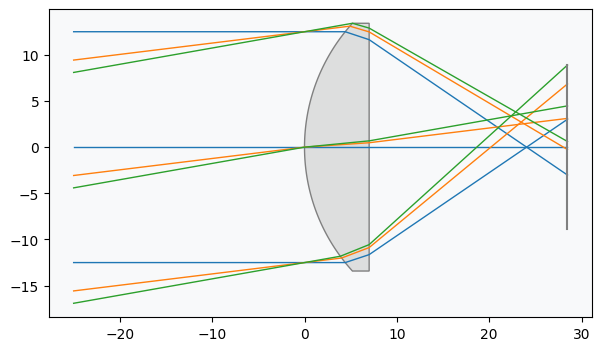
Trace Rays Through the Lens
To view the impact of the coating, we will trace rays through the largest field point, then plot the ray transmission as a function of the intersection point on the first surface. This is done via a simple call to the trace method of the singlet instance. The final rays (at the image surface) are also stored, but we will not use them here.
rays_out = singlet.trace(
Hx=0,
Hy=1,
wavelength=0.55,
num_rays=256,
distribution="uniform",
)Retrieve Intersection Points and Intensities
Retrieve intersection points and ray intensities:
# retrieve ray positions on first surface
x1 = singlet.surface_group.x[1, :]
y1 = singlet.surface_group.y[1, :]
# retrieve intensity on last surface for all rays
intensity = singlet.surface_group.intensity[-1, :]Plot Intensity Distribution on Surface
Plot the result:
plt.scatter(x1, y1, c=intensity, cmap="viridis")
plt.xlabel("X (mm)")
plt.ylabel("Y (mm)")
plt.axis("image")
cbar = plt.colorbar()
cbar.set_label("Intensity (a.u.)", labelpad=20, rotation=270)
plt.show()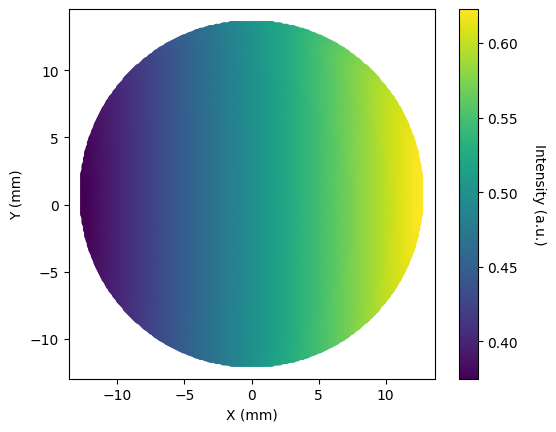
Define a Spectrally-Dependent Coating
This was a simple example showing how transmission can be made to depend on the intersection point on a surface. We could have built a significantly more complex coating that utilized any of the available ray properties, including:
- Local intersection point on the surface
- Direction cosines of the rays
- Wavelength
- Ray intensity
- Ray optical path length (at point of intersection)
- Ray polarization state
- Surface normals at intersection location
Let's create one more simple example to show how to create a spectrally-dependent coating.
class SpectralCoating(BaseCoating):
def reflect(self, rays, nx, ny, nz):
# for reflection, we leave the rays unchanged
return rays
def transmit(self, rays, nx, ny, nz):
transmission = (
rays.w**2 + 0.2
) # apply spectral transmission based on ray wavelength
rays.i *= transmission
return raysShow full code listing
from optiland.coatings import BaseCoating
import matplotlib.pyplot as plt
import numpy as np
from optiland import optic
class GradientCoating(BaseCoating):
 def reflect(self, rays, nx, ny, nz):
     # for reflection, we leave the rays unchanged
     return rays

 def transmit(self, rays, nx, ny, nz):
     rays.i = (
         rays.x * 0.01 + 0.5
     )  # apply gradient to ray intensity based on ray x position
     return rays
class Singlet(optic.Optic):
 """Singlet lens with a gradient coating."""

 def __init__(self):
     super().__init__()

     # define the coating here
     coating = GradientCoating()

     # add surfaces
     self.add_surface(index=0, radius=np.inf, thickness=np.inf)
     self.add_surface(
         index=1,
         thickness=7,
         radius=19.93,
         is_stop=True,
         material="N-SF11",
         coating=coating,
     )  # <-- Assign gradient coating to surface
     self.add_surface(index=2, thickness=21.48)
     self.add_surface(index=3)

     # add aperture
     self.set_aperture(aperture_type="EPD", value=25)

     # add field
     self.set_field_type(field_type="angle")
     self.add_field(y=0)
     self.add_field(y=7)
     self.add_field(y=10)

     # add wavelength
     self.add_wavelength(value=0.55, is_primary=True)
singlet = Singlet()
singlet.draw()
rays_out = singlet.trace(
 Hx=0,
 Hy=1,
 wavelength=0.55,
 num_rays=256,
 distribution="uniform",
)
# retrieve ray positions on first surface
x1 = singlet.surface_group.x[1, :]
y1 = singlet.surface_group.y[1, :]

# retrieve intensity on last surface for all rays
intensity = singlet.surface_group.intensity[-1, :]
plt.scatter(x1, y1, c=intensity, cmap="viridis")
plt.xlabel("X (mm)")
plt.ylabel("Y (mm)")
plt.axis("image")
cbar = plt.colorbar()
cbar.set_label("Intensity (a.u.)", labelpad=20, rotation=270)
plt.show()
class SpectralCoating(BaseCoating):
 def reflect(self, rays, nx, ny, nz):
     # for reflection, we leave the rays unchanged
     return rays

 def transmit(self, rays, nx, ny, nz):
     transmission = (
         rays.w**2 + 0.2
     )  # apply spectral transmission based on ray wavelength
     rays.i *= transmission
return raysConclusions
- This tutorial showed how to add custom coatings to surfaces in Optiland.
- Creating a custom coating only requires you inherit from BaseCoating, then define the reflect and transmit methods.
- We created a simple gradient coating and a spectrally-resolved coating.
- More advanced coatings can be made that are dependent on the ray properties, or surface normals.
Next tutorials
Original notebook: Tutorial_10b_Custom_Coating_Types.ipynb on GitHub · ReadTheDocs