Color Analysis for Thin-Films
Perceive the visual appearance of coatings using colorimetry tools.
Introduction
This example shows how the reflected color of a TiO2 thin film on silica evolves with thickness. We compute chromaticity coordinates from a normalized reflected spectrum and visualize the path on the CIE 1931 diagram, then summarize the color evolution with a thickness color bar.
Goals
- Compute chromaticity for a TiO2 layer on SiO2.
- Trace the chromaticity path for thicknesses from 0 to 250 nm.
- Visualize the perceived color as a function of thickness.
Core concepts used
Step-by-step build
Import colorimetry and thin-film libraries
import matplotlib.pyplot as plt
import optiland.backend as be
from optiland.materials import IdealMaterial, Material
from optiland.thin_film import SpectralAnalyzer, ThinFilmStack
from optiland.colorimetry.plotting import plot_cie_1931_chromaticity_diagramDefine the TiO2-on-SiO2 stack and wavelength grid
We use air as the incident medium, a TiO2 layer with variable thickness, and a silica (SiO2) substrate. The spectrum is sampled from 380 to 780 nm with a 5 nm step.
air = IdealMaterial(n=1.0)
sio2 = Material("SiO2", reference="Gao")
tio2 = Material("TiO2", reference="Zhukovsky")

stack = ThinFilmStack(incident_material=air, substrate_material=sio2)
stack.add_layer_nm(tio2, 0.0, name="TiO2")

analyzer = SpectralAnalyzer(stack)

max_thickness_nm = 250.0
wavelengths_nm = be.linspace(380.0, 780.0, 81)
thicknesses_nm = be.linspace(0.0, max_thickness_nm, 251)Compute CIE chromaticity coordinates for each thickness
We compute the reflected spectrum for each thickness, then extract CIE and an sRGB triplet for visualization. The spectrum is a normalized power quantity (R), which is sufficient for chromaticity.
x_path = []
y_path = []
colors = []

for thickness_nm in thicknesses_nm:
 stack.layers[0].thickness_um = float(thickness_nm) / 1000.0

 result = analyzer.analyze_color(
     wavelength_values=wavelengths_nm,
     wavelength_unit="nm",
     aoi=0.0,
     aoi_unit="deg",
     polarization="u",
     quantity="R",
     observer="2deg",
 )

 x, y, _ = result["xyY"]
 r, g, b = result["sRGB"]

 x_path.append(x)
 y_path.append(y)
colors.append([r / 255.0, g / 255.0, b / 255.0])Plot the chromaticity path on the CIE 1931 diagram
We plot the path and mark the start (0 nm) and end (250 nm) points.
fig, ax = plot_cie_1931_chromaticity_diagram(color="fill")

ax.plot(x_path, y_path, color="black", linewidth=1.2, alpha=0.7)
ax.scatter(x_path[0], y_path[0], s=30, color=colors[0], label="0 nm")
ax.scatter(x_path[-1], y_path[-1], s=30, color=colors[-1], label="250 nm")
ax.legend()

plt.show()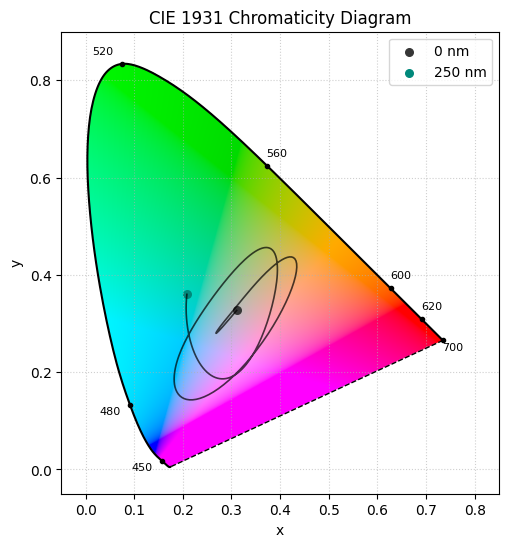
Render the Michel-Levy color bar versus thickness
This compact color bar summarizes the perceived reflected color as a function of TiO_2 thickness. We obtain the Michel-Levy chart.
colors_array = be.asarray(colors)
colors_image = colors_array[None, :, :]

fig, ax = plt.subplots(figsize=(8, 1.6))
ax.imshow(
 colors_image,
 aspect="auto",
 extent=[float(thicknesses_nm[0]), float(thicknesses_nm[-1]), 0, 1],
)
ax.set_yticks([])
ax.set_xlabel("TiO2 thickness (nm)")
ax.set_title("Reflected color vs thickness")

plt.show()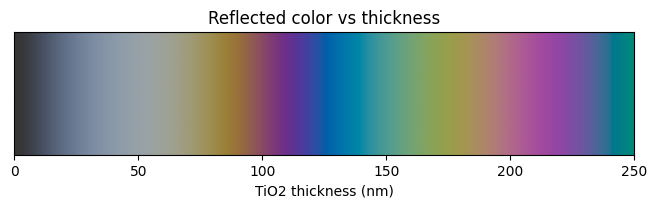
Show full code listing
import matplotlib.pyplot as plt
import optiland.backend as be
from optiland.materials import IdealMaterial, Material
from optiland.thin_film import SpectralAnalyzer, ThinFilmStack
from optiland.colorimetry.plotting import plot_cie_1931_chromaticity_diagram


air = IdealMaterial(n=1.0)
sio2 = Material("SiO2", reference="Gao")
tio2 = Material("TiO2", reference="Zhukovsky")

stack = ThinFilmStack(incident_material=air, substrate_material=sio2)
stack.add_layer_nm(tio2, 0.0, name="TiO2")

analyzer = SpectralAnalyzer(stack)

max_thickness_nm = 250.0
wavelengths_nm = be.linspace(380.0, 780.0, 81)
thicknesses_nm = be.linspace(0.0, max_thickness_nm, 251)

x_path = []
y_path = []
colors = []

for thickness_nm in thicknesses_nm:
  stack.layers[0].thickness_um = float(thickness_nm) / 1000.0

  result = analyzer.analyze_color(
      wavelength_values=wavelengths_nm,
      wavelength_unit="nm",
      aoi=0.0,
      aoi_unit="deg",
      polarization="u",
      quantity="R",
      observer="2deg",
  )

  x, y, _ = result["xyY"]
  r, g, b = result["sRGB"]

  x_path.append(x)
  y_path.append(y)
  colors.append([r / 255.0, g / 255.0, b / 255.0])

fig, ax = plot_cie_1931_chromaticity_diagram(color="fill")

ax.plot(x_path, y_path, color="black", linewidth=1.2, alpha=0.7)
ax.scatter(x_path[0], y_path[0], s=30, color=colors[0], label="0 nm")
ax.scatter(x_path[-1], y_path[-1], s=30, color=colors[-1], label="250 nm")
ax.legend()

plt.show()

colors_array = be.asarray(colors)
colors_image = colors_array[None, :, :]

fig, ax = plt.subplots(figsize=(8, 1.6))
ax.imshow(
  colors_image,
  aspect="auto",
  extent=[float(thicknesses_nm[0]), float(thicknesses_nm[-1]), 0, 1],
)
ax.set_yticks([])
ax.set_xlabel("TiO2 thickness (nm)")
ax.set_title("Reflected color vs thickness")

plt.show()
Conclusions
SpectralAnalyzer.analyze_colorconverts a raw reflectance spectrum directly into CIE XYZ tristimulus values, xyY chromaticity coordinates, and sRGB display values, bridging thin-film physics and human color perception in a single call.- Sweeping a TiO2 layer from 0 to 250 nm on a SiO2 substrate traces a curved path through the CIE 1931 chromaticity diagram, reproducing the classic thin-film color evolution (analogous to the Michel-Levy interference chart in mineralogy).
- The 2-degree standard observer was used throughout, matching the photopic sensitivity of the human fovea and ensuring the computed colors are meaningful for display and visual inspection applications.
- Accumulating sRGB triplets across the thickness sweep and rendering them as a 1D color bar provides an immediate visual reference — a designer can read off the perceived coating color directly from the layer thickness axis.
- The same workflow generalizes to any single-layer or multilayer stack: substitute different materials or add more layers, and the chromaticity path and color bar update automatically without changing the analysis code.
Next tutorials
Original notebook: Tutorial_6e_Color_Analysis_For_Thin_Film.ipynb on GitHub · ReadTheDocs