Thorlabs Catalogue
Directly import Thorlabs components from the web and analyze their sensitivity.
Introduction
This tutorial shows how to retrieve optical components from the Thorlabs lens catalogue. Building on the previous tutorial, we will show:
- How to retrieve a lens model directly from the Thorlabs website
- How to modify the lens properties after retrieval
Core concepts used
Step-by-step build
Import Required Libraries
import matplotlib.pyplot as plt
import numpy as np

from optiland import analysis
from optiland.fileio import load_zemax_fileLoad Lens Directly from URL
File retrieval
As mentioned in the previous tutorial, the load_zemax_file function can accept either a Zemax (.zmx) file directly or a URL link to the file. Here, we will use the a Thorlabs Matched Achromatic Pair Lens and we will pass the URL directly to ZemaxFileReader. Optiland will download the file prior to reading the .zmx file.
# link to the .zmx file on Thorlabs website
url = "https://www.thorlabs.com/_sd.cfm?fileName=20565-S03.zmx&partNumber=MAP051950-A"

lens = load_zemax_file(url)Draw the Imported Lens
We then draw the lens.
lens.draw()
Inspect Lens Data
Let's print an overview of the lens data:
lens.info()Generate Nominal Spot Diagram
Lens Analysis
Let's plot the nominal spot diagram:
spot = analysis.SpotDiagram(lens)
spot.view()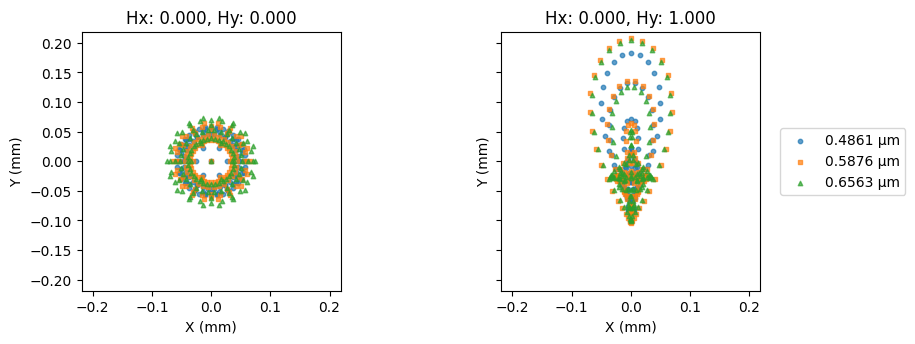
Sweep Object Plane Position
The lens is designed for finite conjugate applications. As an exercise, let's monitor the RMS spot size as a function of the object position. As we shift the object plane, we will reposition the image plane to the paraxial image location. We will use the on-axis field point (index=0) and the central wavelength (index=1).
# we will shift the object plane by ±3.0 mm from the nominal location
dz = np.linspace(-3.0, 3.0, 64)

# thickness between the object surface and the first lens surface
thickness = dz + 16.3412  # nominal location = 16.3412 mm

# set the wavelength and field indices
wavelength_idx = 1
field_idx = 0

# initialize variables
rms_spot_radius = []

for z in thickness:
 # change thickness on the first surface
 lens.updater.set_thickness(value=z, surface_number=0)

 # move image plane to maintain focus
 lens.image_solve()

 # generate spot diagram data
 spot = analysis.SpotDiagram(lens)

 # calculate RMS spot radius
rms_spot_radius.append(spot.rms_spot_radius()[field_idx][wavelength_idx])Plot RMS Spot Size vs. Object Shift
plt.plot(dz, rms_spot_radius)
plt.xlabel("Object plane shift (mm)")
plt.ylabel("RMS Spot Radius (mm)")
plt.title("RMS Spot Radius vs. Object Plane Shift")
plt.grid()
plt.show()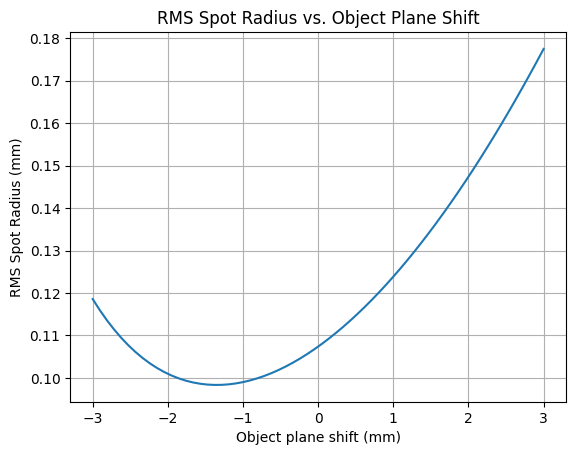
Show full code listing
import matplotlib.pyplot as plt
import numpy as np

from optiland import analysis
from optiland.fileio import load_zemax_file

# link to the .zmx file on Thorlabs website
url = "https://www.thorlabs.com/_sd.cfm?fileName=20565-S03.zmx&partNumber=MAP051950-A"

lens = load_zemax_file(url)

lens.draw()

lens.info()

spot = analysis.SpotDiagram(lens)
spot.view()

# we will shift the object plane by ±3.0 mm from the nominal location
dz = np.linspace(-3.0, 3.0, 64)

# thickness between the object surface and the first lens surface
thickness = dz + 16.3412  # nominal location = 16.3412 mm

# set the wavelength and field indices
wavelength_idx = 1
field_idx = 0

# initialize variables
rms_spot_radius = []

for z in thickness:
  # change thickness on the first surface
  lens.updater.set_thickness(value=z, surface_number=0)

  # move image plane to maintain focus
  lens.image_solve()

  # generate spot diagram data
  spot = analysis.SpotDiagram(lens)

  # calculate RMS spot radius
  rms_spot_radius.append(spot.rms_spot_radius()[field_idx][wavelength_idx])

plt.plot(dz, rms_spot_radius)
plt.xlabel("Object plane shift (mm)")
plt.ylabel("RMS Spot Radius (mm)")
plt.title("RMS Spot Radius vs. Object Plane Shift")
plt.grid()
plt.show()
Conclusions
- This tutorial showed how to retrieve and analyze a Thorlabs catalogue lens.
- We modified the lens properties and assessed the RMS spot size of the on-axis field as a function of the object plane shift. We compensated for the object shift by repositioning the image plane to the paraxial image location.
Next tutorials
Original notebook: Tutorial_9b_Thorlabs_Catalogue.ipynb on GitHub · ReadTheDocs