
Configurable Backend#
Optiland’s core computations are routed through a unified backend abstraction layer, allowing seamless use of either NumPy or PyTorch. All numerical operations, including array creation, linear algebra, trigonometric functions, and more, are automatically dispatched to the selected backend without changing your code. This design ensures:
Consistent API across backends
Easy GPU acceleration via PyTorch
Full compatibility with ML/DL workflows
Simplified maintenance and extensibility
Importing and Selecting a Backend#
Begin by importing the backend module instead of numpy or torch directly:
import optiland.backend as be
By default, Optiland uses the NumPy backend. To switch to PyTorch:
# for torch with CUDA support, it must be installed manually, e.g.:
#   pip install torch torchvision torchaudio --extra-index-url https://download.pytorch.org/whl/cu118
be.set_backend("torch")
To explicitly revert to NumPy at any time:
be.set_backend("numpy")
It is generally recommended to restart the Python kernel after switching backends to avoid unexpected behavior.
NumPy Backend#
The NumPy backend provides pure-CPU execution and leverages Numba JIT compilation for hotspots. Common functions (e.g., sum, cos, sin, dot, etc.) are automatically proxied from NumPy into optiland.backend:
# under the hood, be.sum == numpy.sum, etc.
x = be.arange(0.0, 1.0, 0.1)    # array creation
y = be.sin(x)                   # trigonometric
total = be.sum(y)               # reduction
Because of automatic patching, you do not need to re‑implement any basic routines in the NumpyBackend class.
PyTorch Backend#
The PyTorch backend routes operations through torch.* and adds configurable device, precision, and gradient settings:
Device management Select CPU or CUDA:
be.set_device("cuda") # or "cpu"
Precision control Choose between single- and double‑precision floats:
be.set_precision("float32") # or "float64"
Global gradient mode Enable or disable autograd across all PyTorch operations:
be.grad_mode.enable()    # all ops will track gradients
be.grad_mode.disable()   # disable gradient tracking
Example usage:
import optiland.backend as be

be.set_backend("torch")
be.set_device("cuda")
be.set_precision("float64")
be.grad_mode.enable()

# now every be.* call (e.g. be.matmul, be.exp) uses torch.cuda.FloatTensor,
# with gradient support enabled.
Tip
On VRAM-limited GPUs (e.g. 4-8 GB laptop/consumer cards), throughput is
not monotonic with ray count. As allocations approach the physical
VRAM limit, the CUDA driver starts spilling/evicting memory, and trace
speed can collapse by 5-10x well before you get an actual out-of-memory
error – which makes the underlying cause easy to misdiagnose. If a
trace() call is much slower than expected, check
torch.cuda.max_memory_allocated() first: if it is close to your
card’s total VRAM, reduce num_rays (or split the trace into smaller
batches) or switch to be.set_precision("float32") rather than
assuming there is a bug. When only the returned rays are needed,
trace(..., record=False) skips the per-surface ray snapshots and
roughly triples the ray count that fits on the card.
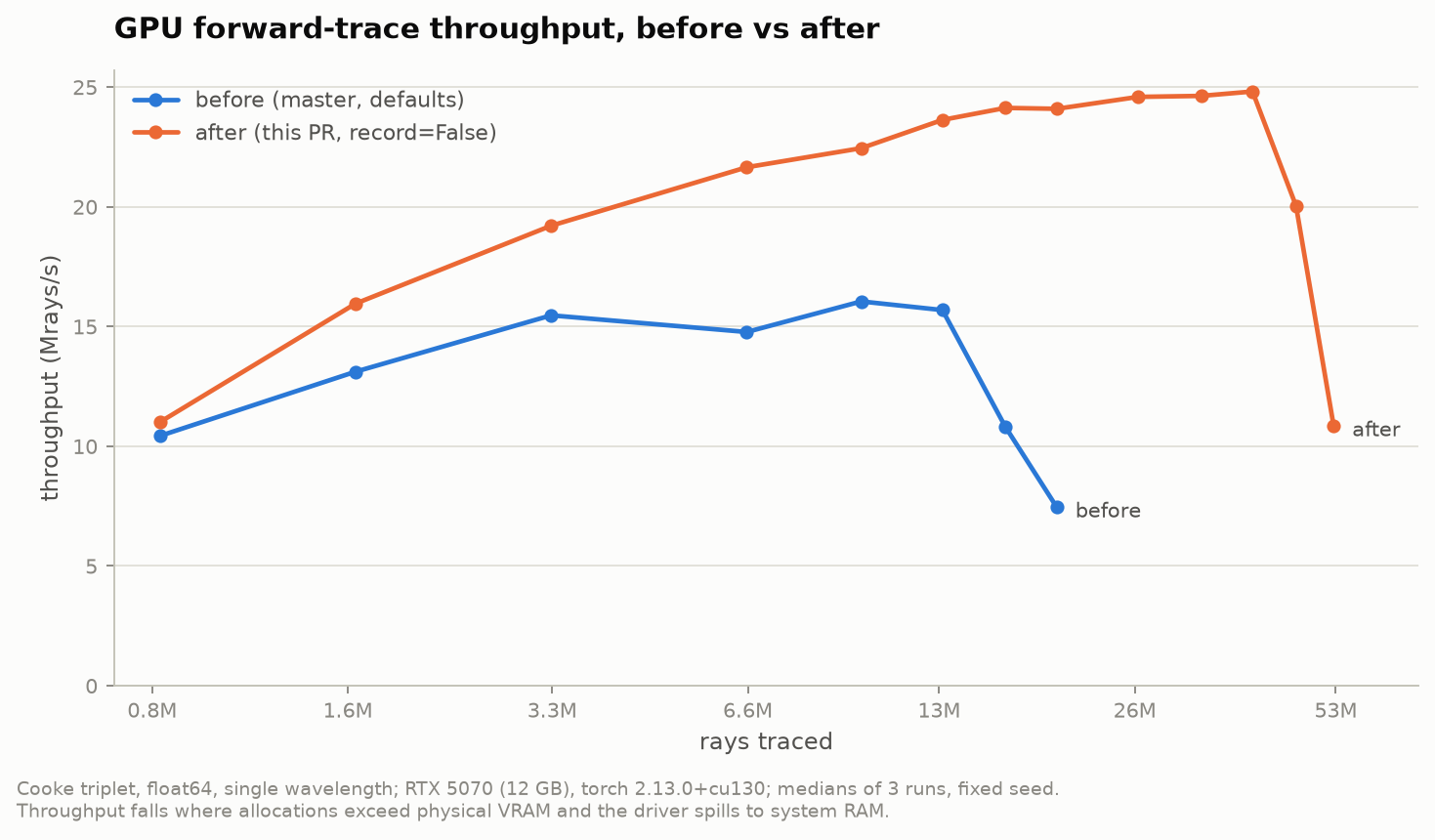
Throughput vs ray count on a 12 GB card (Cooke triplet, float64, single wavelength). Traces stay fast until allocations reach physical VRAM; skipping per-surface snapshots moves that point out by roughly 3x.#
Adding New Functionality#
When extending Optiland, always import operations from optiland.backend to ensure compatibility across both backends:
from optiland.backend import array, dot, sqrt

def my_custom_metric(x, y):
    return dot(x, y) / sqrt(dot(x, x) * dot(y, y))
If you define a function that relies on a backend-specific feature, add it to the NumpyBackend and TorchBackend classes, as well as the AbstractBackend interface, following the existing patterns.
Backend Implementation Details#
Dynamic Dispatch: The backend uses a __getattr__ function to dynamically dispatch calls to the active backend class instance.
Abstract Backend: The backend.base.AbstractBackend class defines the contract and common interfaces for all backends.
NumPy Backend: The backend.numpy_backend.NumpyBackend class defines a _lib attribute that points to the numpy library, allowing for a fallback to the NumPy namespace for functions not explicitly defined.
PyTorch Backend: The backend.torch_backend.TorchBackend class explicitly defines or maps all supported functions to PyTorch operations.
`to_numpy` Utility: The optiland.backend.utils module provides a to_numpy function to convert backend-specific arrays to NumPy arrays.
Best Practices#
Use `be.*` everywhere. Never import np or torch directly in Optiland modules - you’ll break backend neutrality. There are exceptions, but they are rare.
Test on both backends. Our CI includes pytest fixtures that run the full test suite under both NumPy and PyTorch modes. If you add a new feature, follow existing testing patterns to ensure it works on both backends.
Document backend-specific behavior. If a function has different characteristics, note it in the docstring.
Use `to_numpy` for conversions: When you need to convert a backend array to a NumPy array (e.g., for plotting), use the to_numpy function from optiland.backend.utils.
Troubleshooting#
“Module ‘torch’ not found” Ensure you have installed a PyTorch build with appropriate CUDA support (if you wish to use GPU).
Precision mismatches Verify be.get_precision() matches your expectations before heavy computations. PyTorch is strict about tensor types and will raise errors if you mix types.
Device mismatches Check be.get_device() and confirm your tensors reside on the correct device.
Potential Future Backends#
Support for both JAX and/or CuPy backends are under consideration. If you have experience with these libraries and would like to contribute, please reach out!
Note
For new contributions or questions about the backend layer, please open an issue or pull request on our GitHub repository. We welcome feedback and improvements!
How to Extend This#
Scenario: Add a backend-agnostic utility function to Optiland.
Step 1: Write the function using only import optiland.backend as be — never import
numpy or torch directly inside Optiland modules.
Step 2: If the function needs a backend-specific API (e.g., torch.autograd.grad), add
abstract and concrete implementations to AbstractBackend, NumpyBackend, and
TorchBackend in optiland/backend/.
Step 3: Test on both backends using the set_test_backend fixture from
tests/conftest.py and assert_allclose from tests/utils.py.
For step-by-step guidance, see Extension Recipes.